

PostgreSQL HA with ProxySQL & Orchestrator — 4-Part Series
- Part 1: Architecture & Streaming Replication (You Are Here)
- Part 2: ProxySQL — Read/Write Splitting
- Part 3: Orchestrator — Topology Discovery & Failover
- Part 4: End-to-End Integration & Failover Scenarios
ProxySQL 3.0 introduced native PostgreSQL protocol support, bringing the same connection pooling, query routing, and read/write splitting that MySQL DBAs have relied on for years. Meanwhile, the ProxySQL team forked Orchestrator and added PostgreSQL streaming replication support — topology discovery, failure detection, and automated failover via pg_promote().
This series builds the complete stack from scratch: 3 PostgreSQL nodes, ProxySQL for traffic management, and Orchestrator for automated failover. Everything runs on local Multipass VMs so you can test and break things safely.
WHAT YOU'LL BUILD: A production-representative PostgreSQL HA topology with automated read/write splitting and failover — all running locally at zero cost.
Architecture Overview
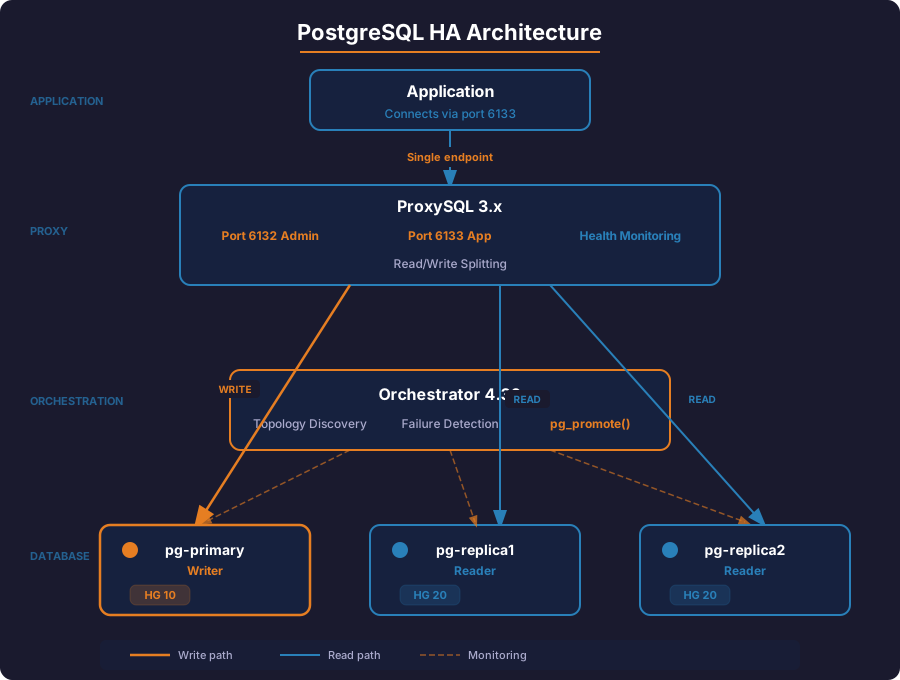
The final architecture has four layers:
| Layer | Component | Role |
|---|---|---|
| Application | psql / your app | Connects to ProxySQL on port 6133 |
| Proxy | ProxySQL 3.x | Connection pooling, read/write splitting, health monitoring |
| Orchestration | Orchestrator 4.30+ | Topology discovery, failure detection, automated promotion |
| Database | PostgreSQL 17 (×3) | 1 primary + 2 streaming replicas |
How the components interact:
- Applications connect to ProxySQL on a single endpoint (port 6133). They never talk to PostgreSQL directly.
- ProxySQL routes writes to the primary (hostgroup 10) and reads to replicas (hostgroup 20). Its built-in monitor calls
pg_is_in_recovery()on each backend to detect role changes. - Orchestrator continuously polls
pg_stat_replicationto map the topology. When the primary fails, it promotes the most up-to-date replica and rewires the surviving replica to follow the new primary. - Post-failover hooks notify ProxySQL to update its hostgroup assignments, completing the failover in under 2 seconds.
VM Layout and Network Plan
We use Multipass to spin up four Ubuntu 24.04 VMs. Each gets a static-enough IP from the Multipass bridge network.
| VM Name | Role | Key Ports |
|---|---|---|
pg-primary | PostgreSQL primary | 5432 |
pg-replica1 | PostgreSQL replica 1 | 5432 |
pg-replica2 | PostgreSQL replica 2 | 5432 |
proxy-orch | ProxySQL + Orchestrator | 6132 (admin), 6133 (app), 3098 (orch UI) |
WHY SEPARATE VMs? Containers work fine for quick demos, but Multipass VMs behave like real servers — systemd services, persistent storage, network interfaces. When you test failover, you want to simulate actual machine failures (multipass stop pg-primary), not just kill a container process.
Step 1: Launch the Multipass VMs
Multipass is a lightweight VM manager that creates isolated Ubuntu instances in seconds. Each VM behaves like a real server with its own IP, systemd, and persistent storage — so when you multipass stop pg-primary later, it simulates a real server crash.
Install Multipass if you don't have it:
# macOS
brew install multipass

# Ubuntu
sudo snap install multipass
Launch all four VMs with 2 GB RAM and 10 GB disk each:
multipass launch 24.04 --name pg-primary  --cpus 2 --memory 2G --disk 10G
multipass launch 24.04 --name pg-replica1 --cpus 2 --memory 2G --disk 10G
multipass launch 24.04 --name pg-replica2 --cpus 2 --memory 2G --disk 10G
multipass launch 24.04 --name proxy-orch  --cpus 2 --memory 2G --disk 10G
Get the IP addresses — you'll need these throughout the series:
multipass list
Sample output:
Name          State    IPv4             Image
pg-primary    Running  192.168.64.2     Ubuntu 24.04 LTS
pg-replica1   Running  192.168.64.3     Ubuntu 24.04 LTS
pg-replica2   Running  192.168.64.4     Ubuntu 24.04 LTS
proxy-orch    Running  192.168.64.5     Ubuntu 24.04 LTS
NOTE YOUR IPs: Multipass assigns IPs dynamically. Replace the example IPs throughout this guide with your actual values. Consider adding entries to /etc/hosts on each VM for convenience.
Set up hostname resolution so VMs can reach each other by name instead of IP. This is essential — replication, monitoring, and failover all use hostnames. Replace the IPs below with your actual values:
# Run on each VM — adjust IPs to match your multipass list output
for vm in pg-primary pg-replica1 pg-replica2 proxy-orch; do
  multipass exec $vm -- sudo bash -c 'cat >> /etc/hosts << EOF
192.168.64.2  pg-primary
192.168.64.3  pg-replica1
192.168.64.4  pg-replica2
192.168.64.5  proxy-orch
EOF'
done
Step 2: Install PostgreSQL 17 on All Three Database VMs
Run the following on pg-primary, pg-replica1, and pg-replica2:
# Add the PostgreSQL APT repository
multipass exec pg-primary -- sudo bash -c '
  apt-get update
  apt-get install -y curl ca-certificates
  install -d /usr/share/postgresql-common/pgdg
  curl -o /usr/share/postgresql-common/pgdg/apt.postgresql.org.asc \
    --fail https://www.postgresql.org/media/keys/ACCC4CF8.asc
  echo "deb [signed-by=/usr/share/postgresql-common/pgdg/apt.postgresql.org.asc] \
    https://apt.postgresql.org/pub/repos/apt $(lsb_release -cs)-pgdg main" \
    > /etc/apt/sources.list.d/pgdg.list
  apt-get update
  apt-get install -y postgresql-17
'
Repeat for the other two nodes:
for vm in pg-replica1 pg-replica2; do
  multipass exec $vm -- sudo bash -c '
    apt-get update
    apt-get install -y curl ca-certificates
    install -d /usr/share/postgresql-common/pgdg
    curl -o /usr/share/postgresql-common/pgdg/apt.postgresql.org.asc \
      --fail https://www.postgresql.org/media/keys/ACCC4CF8.asc
    echo "deb [signed-by=/usr/share/postgresql-common/pgdg/apt.postgresql.org.asc] \
      https://apt.postgresql.org/pub/repos/apt $(lsb_release -cs)-pgdg main" \
      > /etc/apt/sources.list.d/pgdg.list
    apt-get update
    apt-get install -y postgresql-17
  '
done
Verify installation on each node:
multipass exec pg-primary -- sudo -u postgres psql -c "SELECT version();"
You should see PostgreSQL 17.x in the output.
Step 3: Configure the Primary Node
All configuration happens on pg-primary.
3a. Create Users for Each Component
We need four separate users, each with only the permissions it needs. This follows the principle of least privilege — if any credential is compromised, the blast radius is limited.
| User | Purpose | Key Privilege |
|---|---|---|
replicator | WAL streaming between primary and replicas | REPLICATION |
monitor | ProxySQL health checks (pg_is_in_recovery()) | pg_monitor |
orchestrator | Topology discovery + automated promotion | SUPERUSER (required for pg_promote()) |
appuser | Application queries through ProxySQL | Database owner |
multipass exec pg-primary -- sudo -u postgres psql << 'EOF'
-- Replication user for streaming replication
CREATE USER replicator WITH REPLICATION ENCRYPTED PASSWORD 'repl_pass_2026';

-- Monitoring user for ProxySQL and Orchestrator
CREATE USER monitor WITH ENCRYPTED PASSWORD 'monitor_pass_2026';
GRANT pg_monitor TO monitor;
GRANT CONNECT ON DATABASE postgres TO monitor;

-- Orchestrator user (needs pg_monitor + SUPERUSER for pg_promote())
CREATE USER orchestrator WITH SUPERUSER ENCRYPTED PASSWORD 'orch_pass_2026';
GRANT pg_monitor TO orchestrator;

-- Application user for testing
CREATE USER appuser WITH ENCRYPTED PASSWORD 'app_pass_2026';
CREATE DATABASE appdb OWNER appuser;
EOF
CHANGE THESE PASSWORDS: The passwords shown here (repl_pass_2026, etc.) are for lab use only. In production, use .pgpass files or a secrets manager. Never commit credentials to version control.
3b. Configure postgresql.conf
Edit the primary's configuration:
multipass exec pg-primary -- sudo bash -c 'cat >> /etc/postgresql/17/main/postgresql.conf << EOF

# --- Replication Settings ---
listen_addresses = '"'"'*'"'"'
wal_level = replica
max_wal_senders = 10
max_replication_slots = 10
hot_standby = on
wal_keep_size = 256MB

# Synchronous replication (optional — comment out for async)
# synchronous_standby_names = '"'"'ANY 1 (pg_replica1, pg_replica2)'"'"'
# synchronous_commit = on

# Logging for visibility
log_connections = on
log_disconnections = on
log_replication_commands = on
EOF'
Key parameters explained:
| Parameter | Value | Why |
|---|---|---|
wal_level | replica | Enables WAL shipping for streaming replication |
max_wal_senders | 10 | Allows up to 10 concurrent replication connections (2 replicas + headroom) |
max_replication_slots | 10 | Prevents WAL recycling before replicas consume it |
hot_standby | on | Allows read queries on replicas |
wal_keep_size | 256MB | Keeps extra WAL segments for replicas that fall behind |
3c. Configure pg_hba.conf for Replication Access
Allow the replication user, monitor, and orchestrator to connect from the VM network:
multipass exec pg-primary -- sudo bash -c 'cat >> /etc/postgresql/17/main/pg_hba.conf << EOF

# Replication connections from replicas
host    replication     replicator      192.168.64.0/24     scram-sha-256

# Monitoring connections from ProxySQL
host    postgres        monitor         192.168.64.0/24     scram-sha-256

# Orchestrator connections
host    postgres        orchestrator    192.168.64.0/24     scram-sha-256

# Application connections via ProxySQL
host    appdb           appuser         192.168.64.0/24     scram-sha-256
host    all             all             192.168.64.0/24     scram-sha-256
EOF'
ADJUST THE SUBNET: Replace 192.168.64.0/24 with the actual subnet of your Multipass VMs. Check with multipass list.
3d. Create Replication Slots
Replication slots prevent the primary from recycling WAL segments before replicas have consumed them:
multipass exec pg-primary -- sudo -u postgres psql << 'EOF'
SELECT pg_create_physical_replication_slot('replica1_slot');
SELECT pg_create_physical_replication_slot('replica2_slot');

-- Verify
SELECT slot_name, slot_type, active FROM pg_replication_slots;
EOF
Expected output:
   slot_name    | slot_type | active
----------------+-----------+--------
 replica1_slot  | physical  | f
 replica2_slot  | physical  | f
3e. Restart the Primary
multipass exec pg-primary -- sudo systemctl restart postgresql
multipass exec pg-primary -- sudo systemctl status postgresql
Step 4: Set Up Streaming Replicas
Each replica starts as a base backup of the primary, then continuously streams WAL changes.
4a. Configure Replica 1
First, stop PostgreSQL and remove the default data directory:
multipass exec pg-replica1 -- sudo systemctl stop postgresql
multipass exec pg-replica1 -- sudo -u postgres bash -c '
  rm -rf /var/lib/postgresql/17/main/*
'
Take a base backup from the primary:
multipass exec pg-replica1 -- sudo -u postgres bash -c '
  PGPASSWORD=repl_pass_2026 pg_basebackup \
    -h pg-primary \
    -U replicator \
    -D /var/lib/postgresql/17/main \
    -Fp -Xs -P -R \
    -S replica1_slot
'
The -R flag automatically creates standby.signal and adds primary_conninfo to postgresql.auto.conf. Verify:
multipass exec pg-replica1 -- sudo -u postgres cat /var/lib/postgresql/17/main/postgresql.auto.conf
You should see something like:
primary_conninfo = 'user=replicator password=repl_pass_2026 host=pg-primary port=5432 sslmode=prefer'
primary_slot_name = 'replica1_slot'
Add the same listen and hot_standby settings:
multipass exec pg-replica1 -- sudo bash -c 'cat >> /etc/postgresql/17/main/postgresql.conf << EOF

# --- Replica Settings ---
listen_addresses = '"'"'*'"'"'
hot_standby = on
log_connections = on
log_disconnections = on
EOF'
Configure pg_hba.conf for monitoring and application access:
multipass exec pg-replica1 -- sudo bash -c 'cat >> /etc/postgresql/17/main/pg_hba.conf << EOF

# Monitoring from ProxySQL
host    postgres        monitor         192.168.64.0/24     scram-sha-256

# Orchestrator
host    postgres        orchestrator    192.168.64.0/24     scram-sha-256

# Application connections via ProxySQL
host    appdb           appuser         192.168.64.0/24     scram-sha-256
host    all             all             192.168.64.0/24     scram-sha-256

# Allow replication (needed if this replica gets promoted)
host    replication     replicator      192.168.64.0/24     scram-sha-256
EOF'
Start the replica:
multipass exec pg-replica1 -- sudo systemctl start postgresql
multipass exec pg-replica1 -- sudo systemctl status postgresql
4b. Configure Replica 2
Same process for the second replica:
multipass exec pg-replica2 -- sudo systemctl stop postgresql
multipass exec pg-replica2 -- sudo -u postgres bash -c '
  rm -rf /var/lib/postgresql/17/main/*
'

multipass exec pg-replica2 -- sudo -u postgres bash -c '
  PGPASSWORD=repl_pass_2026 pg_basebackup \
    -h pg-primary \
    -U replicator \
    -D /var/lib/postgresql/17/main \
    -Fp -Xs -P -R \
    -S replica2_slot
'
Add replica configuration:
multipass exec pg-replica2 -- sudo bash -c 'cat >> /etc/postgresql/17/main/postgresql.conf << EOF

# --- Replica Settings ---
listen_addresses = '"'"'*'"'"'
hot_standby = on
log_connections = on
log_disconnections = on
EOF'

multipass exec pg-replica2 -- sudo bash -c 'cat >> /etc/postgresql/17/main/pg_hba.conf << EOF

# Monitoring from ProxySQL
host    postgres        monitor         192.168.64.0/24     scram-sha-256

# Orchestrator
host    postgres        orchestrator    192.168.64.0/24     scram-sha-256

# Application connections via ProxySQL
host    appdb           appuser         192.168.64.0/24     scram-sha-256
host    all             all             192.168.64.0/24     scram-sha-256

# Allow replication (needed if this replica gets promoted)
host    replication     replicator      192.168.64.0/24     scram-sha-256
EOF'

multipass exec pg-replica2 -- sudo systemctl start postgresql
Step 5: Verify Streaming Replication
5a. Check the Primary's Replication Status
multipass exec pg-primary -- sudo -u postgres psql << 'EOF'
-- Check connected replicas
SELECT
  client_addr,
  state,
  sent_lsn,
  write_lsn,
  flush_lsn,
  replay_lsn,
  sync_state
FROM pg_stat_replication;
EOF
Expected output — both replicas connected and streaming:
  client_addr   |   state   |  sent_lsn  | write_lsn  | flush_lsn  | replay_lsn | sync_state
----------------+-----------+------------+------------+------------+------------+------------
 192.168.64.3   | streaming | 0/5000148  | 0/5000148  | 0/5000148  | 0/5000148  | async
 192.168.64.4   | streaming | 0/5000148  | 0/5000148  | 0/5000148  | 0/5000148  | async
5b. Check Replication Slots Are Active
multipass exec pg-primary -- sudo -u postgres psql -c \
  "SELECT slot_name, active, restart_lsn FROM pg_replication_slots;"
Both slots should show active = t:
   slot_name    | active | restart_lsn
----------------+--------+-------------
 replica1_slot  | t      | 0/5000148
 replica2_slot  | t      | 0/5000148
5c. Verify Replicas Are in Recovery Mode
multipass exec pg-replica1 -- sudo -u postgres psql -c "SELECT pg_is_in_recovery();"
multipass exec pg-replica2 -- sudo -u postgres psql -c "SELECT pg_is_in_recovery();"
Both should return t (true) — confirming they're running as standbys.
5d. Test Data Replication
Write data on the primary and verify it appears on both replicas:
# Create a test table and insert data on the primary
multipass exec pg-primary -- sudo -u postgres psql -d appdb << 'EOF'
CREATE TABLE replication_test (
  id serial PRIMARY KEY,
  message text,
  created_at timestamptz DEFAULT now()
);

INSERT INTO replication_test (message) VALUES ('Hello from primary');
INSERT INTO replication_test (message) VALUES ('Replication works!');
EOF

# Read from replica 1
multipass exec pg-replica1 -- sudo -u postgres psql -d appdb -c \
  "SELECT * FROM replication_test;"

# Read from replica 2
multipass exec pg-replica2 -- sudo -u postgres psql -d appdb -c \
  "SELECT * FROM replication_test;"
Both replicas should return the same two rows. If they do, streaming replication is working.
5e. Check Replication Lag
On each replica, check how far behind it is:
multipass exec pg-replica1 -- sudo -u postgres psql << 'EOF'
SELECT
  now() - pg_last_xact_replay_timestamp() AS replication_lag,
  pg_last_wal_receive_lsn() AS received_lsn,
  pg_last_wal_replay_lsn() AS replayed_lsn,
  pg_is_in_recovery() AS is_replica;
EOF
With a quiet system, replication lag should be near zero (a few milliseconds).
Step 6: Verify Replicas Reject Writes
Confirm that replicas are truly read-only:
multipass exec pg-replica1 -- sudo -u postgres psql -d appdb -c \
  "INSERT INTO replication_test (message) VALUES ('Should fail');"
Expected error:
ERROR: cannot execute INSERT in a read-only transaction
This is exactly the behavior ProxySQL relies on — replicas are safe to route SELECT queries to, while all writes must go to the primary.
Step 7: Verify the Monitoring User
The monitor user will be used by ProxySQL's health checks. Verify it can connect and check recovery status from an external node:
# Test from the proxy-orch VM
multipass exec proxy-orch -- bash -c '
  sudo apt-get update && sudo apt-get install -y postgresql-client

  # Test connection to primary
  PGPASSWORD=monitor_pass_2026 psql -h pg-primary -U monitor -d postgres -c \
    "SELECT pg_is_in_recovery();"

  # Test connection to replica1
  PGPASSWORD=monitor_pass_2026 psql -h pg-replica1 -U monitor -d postgres -c \
    "SELECT pg_is_in_recovery();"

  # Test connection to replica2
  PGPASSWORD=monitor_pass_2026 psql -h pg-replica2 -U monitor -d postgres -c \
    "SELECT pg_is_in_recovery();"
'
Expected results:
- pg-primary:
pg_is_in_recovery = f(false — it's the primary) - pg-replica1:
pg_is_in_recovery = t(true — it's a replica) - pg-replica2:
pg_is_in_recovery = t(true — it's a replica)
This is how ProxySQL determines which hostgroup each backend belongs to.
Current Topology
At this point, your cluster looks like this:
                  ┌─────────────────┐
                  │   pg-primary    │
                  │   (read/write)  │
                  │   .64.2:5432    │
                  └────────┬────────┘
                           │ WAL streaming
                ┌──────────┴──────────┐
                │                     │
        ┌───────┴────────┐   ┌───────┴────────┐
        │  pg-replica1   │   │  pg-replica2   │
        │  (read-only)   │   │  (read-only)   │
        │  .64.3:5432    │   │  .64.4:5432    │
        └────────────────┘   └────────────────┘
You have:
- 1 primary accepting reads and writes
- 2 streaming replicas with near-zero lag, rejecting writes
- Replication slots preventing WAL loss if a replica disconnects
- Dedicated users for monitoring, orchestration, replication, and application access
- A proxy-orch VM ready for ProxySQL and Orchestrator installation (Part 2 and Part 3)
Pre-Checks Before Moving to Part 2
Before proceeding to ProxySQL setup, run every check in this table. Each one maps to a real issue we hit during testing — skipping any of these will cause failures later in the series.
| # | Check | Command | Expected Result | Why It Matters |
|---|---|---|---|---|
| 1 | Both replicas streaming | SELECT client_addr, state FROM pg_stat_replication; (on primary) |
2 rows, both state = streaming |
ProxySQL and Orchestrator rely on connected replicas |
| 2 | Replication slots active | SELECT slot_name, active FROM pg_replication_slots; (on primary) |
Both slots active = t |
Inactive slots mean WAL will pile up and replicas will fall behind |
| 3 | Replicas in recovery mode | SELECT pg_is_in_recovery(); (on each replica) |
Returns t on both replicas |
ProxySQL uses this function to determine read-only vs read-write routing |
| 4 | Replicas reject writes | INSERT INTO replication_test (message) VALUES ('test'); (on replica) |
ERROR: cannot execute INSERT in a read-only transaction |
Confirms hot_standby is working — replicas are safe for read traffic |
| 5 | Monitor user can connect from proxy-orch | PGPASSWORD=monitor_pass_2026 psql -h pg-primary -U monitor -d postgres -c "SELECT pg_is_in_recovery();" (from proxy-orch) |
Returns f for primary, t for replicas |
ProxySQL health checks use this user — if it can't connect, monitoring fails silently |
| 6 | Orchestrator user has SUPERUSER | SELECT usename, usesuper FROM pg_user WHERE usename = 'orchestrator'; |
usesuper = t |
Without SUPERUSER, Orchestrator cannot call pg_promote() — automated failover fails with permission denied |
| 7 | Application user has table permissions | PGPASSWORD=app_pass_2026 psql -h pg-primary -U appuser -d appdb -c "SELECT 1;" |
Returns 1 without error |
ProxySQL routes queries as this user — permission errors appear as application failures |
| 8 | primary_conninfo uses IP addresses |
cat postgresql.auto.conf (on each replica) |
host=192.168.x.x — no quoted hostnames like host=''pg-primary'' |
Quoted hostnames cause Orchestrator to split the topology into multiple clusters, breaking automated failover |
| 9 | pg_hba.conf includes replication line on replicas |
grep replication /etc/postgresql/17/main/pg_hba.conf (on each replica) |
host replication replicator <subnet> scram-sha-256 |
If a replica gets promoted to primary, it must accept replication connections from other nodes |
| 10 | /etc/hosts consistent on all VMs |
ping -c1 pg-primary && ping -c1 pg-replica1 && ping -c1 pg-replica2 (on each VM) |
All 3 resolve and respond | VM restarts can lose /etc/hosts entries — DNS failures break replication reconnection |
Run the checks in three groups — replication health, user permissions, and configuration safety.
Replication health (checks 1-4):
# 1. Both replicas streaming
multipass exec pg-primary -- sudo -u postgres psql -c \
  "SELECT client_addr, state, sync_state FROM pg_stat_replication;"
# Expect: 2 rows, both state = streaming

# 2. Replication slots active
multipass exec pg-primary -- sudo -u postgres psql -c \
  "SELECT slot_name, active FROM pg_replication_slots;"
# Expect: both active = t

# 3. Replicas in recovery mode
for vm in pg-replica1 pg-replica2; do
  echo "$vm: $(multipass exec $vm -- sudo -u postgres psql -tAc 'SELECT pg_is_in_recovery();')"
done
# Expect: both return t

# 4. Replicas reject writes
multipass exec pg-replica1 -- sudo -u postgres psql -d appdb -c \
  "INSERT INTO replication_test (message) VALUES ('pre-check');" 2>&1
# Expect: ERROR: cannot execute INSERT in a read-only transaction
User permissions and connectivity (checks 5-7):
# 5. Monitor user connects from proxy-orch
for host in pg-primary pg-replica1 pg-replica2; do
  result=$(multipass exec proxy-orch -- bash -c \
    "PGPASSWORD=monitor_pass_2026 psql -h $host -U monitor -d postgres -tAc 'SELECT pg_is_in_recovery();'" 2>&1)
  echo "$host: $result"
done
# Expect: pg-primary=f, replicas=t

# 6. Orchestrator user has SUPERUSER
multipass exec pg-primary -- sudo -u postgres psql -tAc \
  "SELECT usesuper FROM pg_user WHERE usename = 'orchestrator';"
# Expect: t (required for pg_promote)

# 7. App user can connect
multipass exec proxy-orch -- bash -c \
  "PGPASSWORD=app_pass_2026 psql -h pg-primary -U appuser -d appdb -tAc 'SELECT 1;'"
# Expect: 1
Configuration safety (checks 8-10):
# 8. primary_conninfo uses IP addresses (not quoted hostnames)
for vm in pg-replica1 pg-replica2; do
  echo "$vm: $(multipass exec $vm -- sudo -u postgres bash -c \
    "grep 'host=' /var/lib/postgresql/17/main/postgresql.auto.conf | grep -o 'host=[^ ]*'")"
done
# Expect: host=192.168.x.x (NOT host=''pg-primary'')

# 9. Replication line in pg_hba.conf on replicas
for vm in pg-replica1 pg-replica2; do
  echo "$vm: $(multipass exec $vm -- grep replication /etc/postgresql/17/main/pg_hba.conf | head -1)"
done
# Expect: host replication replicator <subnet> scram-sha-256

# 10. DNS resolution across all VMs
for vm in pg-primary pg-replica1 pg-replica2 proxy-orch; do
  result=$(multipass exec $vm -- ping -c1 -W1 pg-primary 2>&1 >/dev/null && echo "OK" || echo "FAIL")
  echo "$vm: $result"
done
# Expect: all OK
DO NOT PROCEED to Part 2 if any pre-check fails. Each one corresponds to a real issue we encountered during failover testing. Fix the failing check first — the troubleshooting table below covers each scenario.
Troubleshooting
| Symptom | Check | Fix |
|---|---|---|
pg_basebackup hangs or times out |
pg_hba.conf on primary — is the replication line present? |
Add the host replication line, reload with SELECT pg_reload_conf(); |
Replica starts but pg_stat_replication shows nothing |
Check primary_conninfo in postgresql.auto.conf on the replica |
Verify hostname, port, user, password. Check standby.signal file exists. |
Replica shows state = startup instead of streaming |
Check replica logs: journalctl -u postgresql -n 50 |
Usually a WAL gap — re-run pg_basebackup from scratch |
Monitor user gets FATAL: password authentication failed |
Verify pg_hba.conf allows the user from the correct subnet |
Add/fix the host line, reload config |
| Replication lag keeps growing | SELECT * FROM pg_stat_replication; — compare sent_lsn vs replay_lsn |
Check replica disk I/O and CPU. Increase wal_keep_size if needed. |
What's Next
The PostgreSQL replication foundation is in place. In Part 2, we install ProxySQL 3.x on the proxy-orch VM and configure:
- Backend server registration in
pgsql_servers - Read/write splitting with
pgsql_replication_hostgroups - Connection pooling and monitoring
- Query routing rules for automatic read/write separation
- Health check verification using the
monitoruser
The application will connect to a single ProxySQL endpoint while queries are transparently routed to the correct backend based on their type.
CLEAN SHUTDOWN: To pause your lab, run multipass stop --all. Resume later with multipass start --all — replication reconnects automatically.