

PostgreSQL HA with ProxySQL & Orchestrator — 4-Part Series
- Part 1: Architecture & Streaming Replication
- Part 2: ProxySQL — Read/Write Splitting
- Part 3: Orchestrator — Topology Discovery & Failover
- Part 4: Failover Scenarios & Recovery (You Are Here)
This is where we break things on purpose. In the previous parts we built a 3-node PostgreSQL cluster, configured ProxySQL for read/write splitting, and set up Orchestrator for topology discovery. Now we simulate real failures and verify the system recovers correctly.
Every test in this article was run on live Multipass VMs with real PostgreSQL 17.9, ProxySQL 3.0.6, and Orchestrator 4.30.2. The outputs shown are real.
Pre-Failover Checklist
Before breaking anything, verify the entire stack is healthy. We split this into three groups — one per layer. Every check maps to a real failure mode we discovered during testing.
PostgreSQL layer — is replication healthy and are permissions correct?
# 1. All VMs running
multipass list | grep -E 'pg-primary|pg-replica|proxy-orch'

# 2. Both replicas streaming (expect: 2)
multipass exec pg-primary -- sudo -u postgres psql -tAc \
  "SELECT count(*) FROM pg_stat_replication WHERE state = 'streaming';"

# 3. Replication slots active (expect: 2)
multipass exec pg-primary -- sudo -u postgres psql -tAc \
  "SELECT count(*) FROM pg_replication_slots WHERE active = true;"

# 4. Orchestrator user is SUPERUSER (expect: t)
multipass exec pg-primary -- sudo -u postgres psql -tAc \
  "SELECT usesuper FROM pg_user WHERE usename = 'orchestrator';"

# 5. primary_conninfo uses IPs, not quoted hostnames
for vm in pg-replica1 pg-replica2; do
  multipass exec $vm -- sudo -u postgres \
    grep 'host=' /var/lib/postgresql/17/main/postgresql.auto.conf | tail -1
done
# If you see host=''pg-primary'' (with quotes), fix it — this breaks Orchestrator topology
ProxySQL layer — is routing working?
# 6. Primary in hostgroup 10, replicas in hostgroup 20
multipass exec proxy-orch -- PGPASSWORD=admin psql -h 127.0.0.1 -p 6132 -U admin -d admin -c \
  "SELECT hostgroup_id, hostname, status FROM runtime_pgsql_servers ORDER BY hostgroup_id;"
# Expect: 1 ONLINE in hg 10, 2+ ONLINE in hg 20

# 7. No recent ping errors
multipass exec proxy-orch -- PGPASSWORD=admin psql -h 127.0.0.1 -p 6132 -U admin -d admin -tAc \
  "SELECT count(*) FROM monitor.pgsql_server_ping_log WHERE ping_error != '' AND time_start_us > (SELECT max(time_start_us) - 10000000 FROM monitor.pgsql_server_ping_log);"
# Expect: 0

# 8. Write + read through ProxySQL works
multipass exec proxy-orch -- PGPASSWORD=app_pass_2026 psql -h 127.0.0.1 -p 6133 -U appuser -d appdb \
  -tAc "INSERT INTO replication_test (message) VALUES ('pre-failover-check') RETURNING id;"
# Expect: a row ID returned
Orchestrator layer — is it ready to handle a failover?
# 9. Orchestrator topology (single cluster, 1 primary + 2 replicas)
multipass exec proxy-orch -- bash -c '
  export ORCHESTRATOR_API="http://localhost:3098/api"
  orchestrator-client -c topology -i 192.168.2.6:5432
'
# Expect:
#   192.168.2.6:5432   [0s,ok,17.9,rw,>>]
#   + 192.168.2.7:5432 [null,ok,17.9,ro,>>]
#   + 192.168.2.8:5432 [null,ok,17.9,ro,>>]

# 10. Recovery mode
# Two layers: config filter + runtime toggle. Both must allow recovery.
# With RecoverMasterClusterFilters: ["_do_not_match_"], no cluster matches
# even if the runtime toggle is "enabled" — so auto-recovery is blocked.
multipass exec proxy-orch -- bash -c '
  export ORCHESTRATOR_API="http://localhost:3098/api"
  orchestrator-client -c check-global-recoveries
'
# Expect: enabled (this is the runtime toggle — safe because the config
# filter "_do_not_match_" prevents any cluster from auto-recovering)

# 11. No replication problems detected
multipass exec proxy-orch -- bash -c '
  export ORCHESTRATOR_API="http://localhost:3098/api"
  orchestrator-client -c replication-analysis
'
# Expect: empty output (no problems)
STOP if any check fails. The three silent killers for automated failover are: (1) primary_conninfo with quoted hostnames → topology split → Orchestrator sees DeadMasterWithoutReplicas, (2) orchestrator user missing SUPERUSER → pg_promote() returns permission denied, (3) stale recovery history blocks new recoveries for RecoveryPeriodBlockSeconds.
Step 1: Capture the Pre-Failover State
Before breaking anything, document the healthy state across all three layers. This gives us a baseline to compare against after each failover.
# PostgreSQL replication
multipass exec pg-primary -- sudo -u postgres psql -c \
  "SELECT client_addr, state, sync_state FROM pg_stat_replication;"
 client_addr |   state   | sync_state
-------------+-----------+------------
 192.168.2.7 | streaming | async
 192.168.2.8 | streaming | async
# ProxySQL routing
multipass exec proxy-orch -- PGPASSWORD=admin psql -h 127.0.0.1 -p 6132 -U admin -d admin \
  -c "SELECT hostgroup_id, hostname, port, status FROM runtime_pgsql_servers ORDER BY hostgroup_id;"
 hostgroup_id |  hostname   | port | status
--------------+-------------+------+--------
 10           | pg-primary  | 5432 | ONLINE
 20           | pg-replica1 | 5432 | ONLINE
 20           | pg-replica2 | 5432 | ONLINE
# Orchestrator topology — the key view to check before and after every failover
multipass exec proxy-orch -- bash -c \
  'export ORCHESTRATOR_API="http://localhost:3098/api"; orchestrator-client -c topology -i 192.168.2.6:5432'
192.168.2.6:5432   [0s,ok,17.9,rw,>>]
+ 192.168.2.7:5432 [null,ok,17.9,ro,>>]
+ 192.168.2.8:5432 [null,ok,17.9,ro,>>]
Primary is rw (read-write), both replicas are ro (read-only), all checks ok.
# Insert test data for data-loss verification
multipass exec proxy-orch -- PGPASSWORD=app_pass_2026 psql \
  -h 127.0.0.1 -p 6133 -U appuser -d appdb \
  -c "INSERT INTO replication_test (message) VALUES ('Pre-failover write');"

multipass exec proxy-orch -- PGPASSWORD=app_pass_2026 psql \
  -h 127.0.0.1 -p 6133 -U appuser -d appdb \
  -c "SELECT count(*) FROM replication_test;"
Note the row count — we expect at least this many rows after recovery.
Scenario 1: Manual Failover (Recommended for PostgreSQL)
This is the recommended approach for PostgreSQL. Orchestrator detects the failure and alerts you, but waits for you to verify the primary is truly dead before promoting. This avoids unnecessary promotions from network glitches — which is critical because Orchestrator cannot rejoin an old primary as a replica in PostgreSQL (unlike MySQL where CHANGE REPLICATION SOURCE TO works on any running instance).
WHY MANUAL IS THE DEFAULT: If auto-failover mis-fires on a network blip, you end up with two primaries (split-brain). The old primary cannot be demoted via Orchestrator — you must run a full pg_basebackup to rejoin it, which can take minutes to hours on large databases. Manual mode lets you verify before promoting.
1a. Kill the Primary VM
multipass stop pg-primary
This is equivalent to pulling the power cable on a physical server. PostgreSQL doesn't get a clean shutdown.
1b. Observe Failure Detection
Both ProxySQL and Orchestrator detect the failure independently. Check ProxySQL first:
# Wait for detection (monitor_ping_interval = 2000ms, max_failures = 3)
sleep 10

# Check ProxySQL's view
multipass exec proxy-orch -- PGPASSWORD=admin psql -h 127.0.0.1 -p 6132 -U admin -d admin << 'EOF'
-- Ping log shows the failure
SELECT hostname, port, ping_success_time_us, ping_error
FROM monitor.pgsql_server_ping_log
ORDER BY time_start_us DESC LIMIT 9;
EOF
Expected output — primary ping fails while replicas stay healthy:
  hostname   | port | ping_success_time_us |     ping_error
-------------+------+----------------------+---------------------
 pg-replica2 | 5432 | 410                  |
 pg-primary  | 5432 | 0                    | Operation timed out
 pg-replica1 | 5432 | 2125                 |
 pg-replica2 | 5432 | 1146                 |
 pg-primary  | 5432 | 0                    | Operation timed out
 pg-primary  | 5432 | 0                    | Operation timed out
 pg-replica1 | 5432 | 1287                 |
Check the runtime server state:
multipass exec proxy-orch -- PGPASSWORD=admin psql -h 127.0.0.1 -p 6132 -U admin -d admin \
  -c "SELECT hostgroup_id, hostname, port, status FROM runtime_pgsql_servers ORDER BY hostgroup_id;"
 hostgroup_id |  hostname   | port | status
--------------+-------------+------+---------
 20           | pg-primary  | 5432 | SHUNNED
 20           | pg-replica1 | 5432 | ONLINE
 20           | pg-replica2 | 5432 | ONLINE
What happened automatically:
- ProxySQL's monitor detected
pg-primaryis unreachable (3 consecutive ping failures) - ProxySQL shunned
pg-primary— no new traffic routed to it - Since there's no server with
read_only = 0(no reachable primary), hostgroup 10 (writer) is now empty - Replicas continue serving reads in hostgroup 20
IMPACT: Reads continue working. Writes fail until a new primary is promoted. This is the expected behavior — ProxySQL detects the failure but doesn't make promotion decisions.
Check the Orchestrator topology — it now shows the primary as unreachable:
# Orchestrator's view during failure
multipass exec proxy-orch -- bash -c \
  'export ORCHESTRATOR_API="http://localhost:3098/api"; orchestrator-client -c topology -i 192.168.2.6:5432'
192.168.2.6:5432   [unknown,invalid,17.9,rw,>>]
+ 192.168.2.7:5432 [null,ok,17.9,ro,>>]
+ 192.168.2.8:5432 [null,ok,17.9,ro,>>]
The primary shows invalid — Orchestrator can't reach it. Replicas still ok.
Also check the replication analysis for the diagnosis:
multipass exec proxy-orch -- bash -c \
  'export ORCHESTRATOR_API="http://localhost:3098/api"; orchestrator-client -c replication-analysis'
192.168.2.6:5432 (cluster 192.168.2.6:5432): DeadPrimary
1c. Verify the Failure Is Real, Then Promote
Orchestrator detected DeadPrimary but did not auto-promote (manual mode is the default). Confirm it's waiting for you:
multipass exec proxy-orch -- grep "NOT Recovering" /tmp/orchestrator.log | tail -2
CheckAndRecover: Analysis: DeadPrimary, InstanceKey: 192.168.2.6:5432:
  NOT Recovering host (disabled globally)
Good — detection works, but no promotion yet. Now verify the primary is truly dead (not just a network blip):
multipass exec proxy-orch -- bash -c \
  'PGPASSWORD=monitor_pass_2026 psql -h 192.168.2.6 -U monitor -d postgres -c "SELECT 1;" 2>&1'
If this returns Connection refused or times out, the primary is genuinely down. Promote:
multipass exec proxy-orch -- bash -c '
  export ORCHESTRATOR_API="http://localhost:3098/api"
  orchestrator-client -c recover -i 192.168.2.6:5432
'
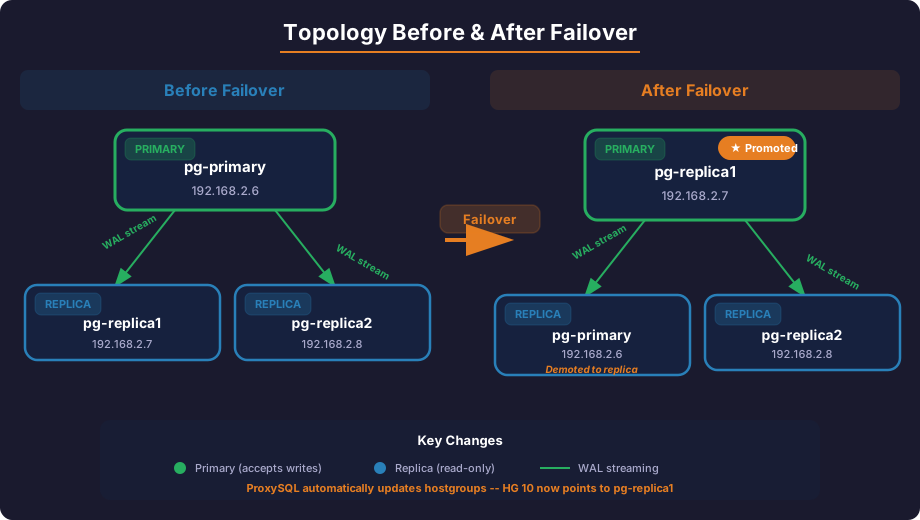
192.168.2.7:5432
Orchestrator selected 192.168.2.7 (the most caught-up replica) and called pg_promote(). Verify:
multipass exec pg-replica1 -- sudo -u postgres psql -c "SELECT pg_is_in_recovery();"
 pg_is_in_recovery
-------------------
 f
Acknowledge the recovery to unblock future failovers:
multipass exec proxy-orch -- bash -c '
  export ORCHESTRATOR_API="http://localhost:3098/api"
  orchestrator-client -c ack-all-recoveries --reason "verified dead primary"
'
CRITICAL PREREQUISITE: The orchestrator PostgreSQL user must have SUPERUSER privileges to call pg_promote(). Without this, the recover command fails with permission denied for function pg_promote. This is set up in Part 1 when creating the user.
1d. Watch ProxySQL Auto-Detect the New Primary
ProxySQL's read-only monitor checks pg_is_in_recovery() every 1000ms. Within seconds of the promotion, it detects that pg-replica1 now returns false:
sleep 5

multipass exec proxy-orch -- PGPASSWORD=admin psql -h 127.0.0.1 -p 6132 -U admin -d admin << 'EOF'
-- ProxySQL automatically moved pg-replica1 to hostgroup 10 (writer)
SELECT hostgroup_id, hostname, port, status
FROM runtime_pgsql_servers ORDER BY hostgroup_id;

-- Read-only monitor confirms the role change
SELECT hostname, port, read_only
FROM monitor.pgsql_server_read_only_log
ORDER BY time_start_us DESC LIMIT 6;
EOF
Expected output:
 hostgroup_id |  hostname   | port | status
--------------+-------------+------+---------
 10           | pg-replica1 | 5432 | ONLINE
 20           | pg-primary  | 5432 | SHUNNED
 20           | pg-replica1 | 5432 | ONLINE
 20           | pg-replica2 | 5432 | ONLINE

  hostname   | port | read_only
-------------+------+-----------
 pg-replica2 | 5432 | 1
 pg-replica1 | 5432 | 0
 pg-replica2 | 5432 | 1
 pg-replica1 | 5432 | 0
 pg-replica2 | 5432 | 1
 pg-replica1 | 5432 | 0
ProxySQL automatically:
- Moved
pg-replica1to hostgroup 10 (writer) becauseread_only = 0 - Kept
pg-replica1in hostgroup 20 too (becausewriter_is_also_reader = true) - Kept
pg-primaryshunned (still unreachable) pg-replica2remains a reader
1e. Verify End-to-End Through ProxySQL
# Write through ProxySQL (goes to pg-replica1, the new primary)
multipass exec proxy-orch -- PGPASSWORD=app_pass_2026 psql \
  -h 127.0.0.1 -p 6133 -U appuser -d appdb \
  -c "INSERT INTO replication_test (message) VALUES ('Post-failover write via ProxySQL');"

sleep 1

# Read through ProxySQL (goes to replicas)
multipass exec proxy-orch -- PGPASSWORD=app_pass_2026 psql \
  -h 127.0.0.1 -p 6133 -U appuser -d appdb \
  -c "SELECT * FROM replication_test ORDER BY id;"

# Verify query routing
multipass exec proxy-orch -- PGPASSWORD=admin psql -h 127.0.0.1 -p 6132 -U admin -d admin \
  -c "SELECT hostgroup hg, digest_text, count_star FROM stats_pgsql_query_digest ORDER BY count_star DESC;"
Writes go to hostgroup 10 (new primary), reads go to hostgroup 20 — routing is correct.
Check the Orchestrator topology after the automatic promotion:
multipass exec proxy-orch -- bash -c \
  'export ORCHESTRATOR_API="http://localhost:3098/api"; orchestrator-client -c topology -i 192.168.2.7:5432'
192.168.2.7:5432   [0s,ok,17.9,rw,>>]
+ 192.168.2.8:5432 [null,ok,17.9,ro,>>]
The promoted replica is now the rw primary.
Scenario 2: Automatic Failover (Optional)
If you accept the risk of false-positive promotions and prefer faster recovery over safety, you can test automatic failover. The difference from Scenario 1: you skip step 1c (manual promote) — Orchestrator calls pg_promote() for you within seconds.
UNDERSTAND THE RISK: If auto-failover triggers on a network glitch, the old primary cannot be rejoined via Orchestrator. You'll need a full pg_basebackup to demote it back to a replica. Only enable this if your network is stable and you accept that cost.
To test automatic mode, first rebuild a clean cluster (see Phase 1), then:
2a. Enable auto-recovery in the config:
# On proxy-orch: edit config to match all clusters
multipass exec proxy-orch -- sudo sed -i \
  's/"_do_not_match_"/".*"/g' /usr/local/orchestrator/orchestrator.conf.json
Restart Orchestrator for the config change to take effect:
multipass exec proxy-orch -- sudo bash -c '
  killall orchestrator; sleep 2
  rm -f /usr/local/orchestrator/orchestrator.sqlite3
  nohup /usr/local/orchestrator/orchestrator \
    -config /usr/local/orchestrator/orchestrator.conf.json http > /tmp/orchestrator.log 2>&1 &
'
Wait 8 seconds, discover the topology, then verify:
multipass exec proxy-orch -- bash -c '
  export ORCHESTRATOR_API="http://localhost:3098/api"
  sleep 8
  orchestrator-client -c discover -i 192.168.2.6:5432
  sleep 8
  orchestrator-client -c topology -i 192.168.2.6:5432
'
2b. Kill the primary and wait:
multipass stop pg-primary
Wait 25 seconds. Orchestrator detects DeadPrimary and promotes automatically — no recover command needed.
2c. Verify auto-promotion happened:
multipass exec proxy-orch -- cat /tmp/orchestrator-recovery.log
You should see:
Detected DeadPrimary on 192.168.2.6:5432. Affected replicas: 2
Master failover complete. Failed: 192.168.2.6:5432; Promoted: 192.168.2.7:5432
2d. Revert to manual mode after testing:
multipass exec proxy-orch -- sudo sed -i \
  's/"\.\*"/"_do_not_match_"/g' /usr/local/orchestrator/orchestrator.conf.json
Restart Orchestrator to pick up the config change.
Scenario 3: Rewire the Surviving Replica
After promoting pg-replica1, pg-replica2 is still connected to the old primary (which is down). We need to point it to the new primary.
3a. Re-Basebackup from the New Primary
A simple ALTER SYSTEM SET primary_conninfo is not enough — the replication slot is tied to the old primary. The cleanest approach is a fresh pg_basebackup:
# Create a replication slot for replica2 on the new primary
multipass exec pg-replica1 -- sudo -u postgres psql \
  -c "SELECT pg_create_physical_replication_slot('replica2_slot');"

# Re-basebackup replica2 from the new primary
multipass exec pg-replica2 -- sudo bash -c '
  systemctl stop postgresql
  sudo -u postgres rm -rf /var/lib/postgresql/17/main/*

  sudo -u postgres PGPASSWORD=repl_pass_2026 pg_basebackup \
    -h pg-replica1 \
    -U replicator \
    -D /var/lib/postgresql/17/main \
    -Fp -Xs -P -R \
    -S replica2_slot

  systemctl start postgresql
'
3b. Verify Replication from the New Primary
# Check the new primary's replication status
multipass exec pg-replica1 -- sudo -u postgres psql \
  -c "SELECT client_addr, state, sync_state FROM pg_stat_replication;"
Expected output:
 client_addr |   state   | sync_state
-------------+-----------+------------
 192.168.2.8 | streaming | async
# Verify replica2 has all the data (including post-failover writes)
multipass exec pg-replica2 -- sudo -u postgres psql -d appdb \
  -c "SELECT * FROM replication_test ORDER BY id;"
All rows should be present, including rows written after the failover.
Scenario 4: Rejoin the Old Primary as a Replica
The old primary can't simply start up and resume — its timeline has diverged. We rejoin it as a replica of the new primary.
CAN ORCHESTRATOR REJOIN FOR YOU? No. We tested every Orchestrator method — relocate, move-below, repoint, move-gtid, set-read-only, start-replica — both via CLI and HTTP API. All fail for PostgreSQL:
relocate→Identical server id: both have 0(PostgreSQL has no server_id)move-below/repoint→instance is not replicating(old primary is standalone)set-read-only→invalid connection(PostgreSQL usespg_is_in_recovery(), notSET GLOBAL read_only)
This is a fundamental difference from MySQL where CHANGE REPLICATION SOURCE TO works on any running instance. In PostgreSQL, rejoining requires pg_rewind (fast, requires wal_log_hints=on) or pg_basebackup (slower, always works). Both are PostgreSQL-native tools.
4a. Start the VM and Re-Basebackup
# Start the old primary VM
multipass start pg-primary

# Wait for it to boot
sleep 10

# Re-add /etc/hosts (may be lost after VM restart)
multipass exec pg-primary -- sudo bash -c 'cat >> /etc/hosts << EOF
192.168.2.6  pg-primary
192.168.2.7  pg-replica1
192.168.2.8  pg-replica2
192.168.2.9  proxy-orch
EOF'

# Create a replication slot on the new primary
multipass exec pg-replica1 -- sudo -u postgres psql \
  -c "SELECT pg_create_physical_replication_slot('replica1_slot');"

# Re-basebackup the old primary as a new replica
multipass exec pg-primary -- sudo bash -c '
  systemctl stop postgresql
  sudo -u postgres rm -rf /var/lib/postgresql/17/main/*

  sudo -u postgres PGPASSWORD=repl_pass_2026 pg_basebackup \
    -h pg-replica1 \
    -U replicator \
    -D /var/lib/postgresql/17/main \
    -Fp -Xs -P -R \
    -S replica1_slot

  systemctl start postgresql
'
4b. Verify the Old Primary Is Now a Replica
# Should return 't' — it's now in recovery mode (a replica)
multipass exec pg-primary -- sudo -u postgres psql -c "SELECT pg_is_in_recovery();"
 pg_is_in_recovery
-------------------
 t
# Should show all data including post-failover writes
multipass exec pg-primary -- sudo -u postgres psql -d appdb \
  -c "SELECT * FROM replication_test ORDER BY id;"

# New primary should show 2 replicas streaming
multipass exec pg-replica1 -- sudo -u postgres psql \
  -c "SELECT client_addr, state, sync_state FROM pg_stat_replication;"
Expected output:
 client_addr |   state   | sync_state
-------------+-----------+------------
 192.168.2.6 | streaming | async
 192.168.2.8 | streaming | async
4c. ProxySQL Automatically Detects the Rejoined Server
Within a few monitor cycles, ProxySQL detects that pg-primary is back online and serving as a reader:
sleep 10

multipass exec proxy-orch -- PGPASSWORD=admin psql -h 127.0.0.1 -p 6132 -U admin -d admin \
  -c "SELECT hostgroup_id, hostname, port, status FROM runtime_pgsql_servers ORDER BY hostgroup_id;"
Expected output:
 hostgroup_id |  hostname   | port | status
--------------+-------------+------+--------
 10           | pg-replica1 | 5432 | ONLINE
 20           | pg-primary  | 5432 | ONLINE
 20           | pg-replica1 | 5432 | ONLINE
 20           | pg-replica2 | 5432 | ONLINE
pg-primary moves from SHUNNED to ONLINE in hostgroup 20 — automatically, with zero manual intervention.
Final Topology After Recovery
                  ┌─────────────────┐
                  │   pg-replica1   │
                  │  (NEW PRIMARY)  │
                  │   .2.7:5432     │
                  └────────┬────────┘
                           │ WAL streaming
                ┌──────────┴──────────┐
                │                     │
        ┌───────┴────────┐   ┌───────┴────────┐
        │  pg-primary    │   │  pg-replica2   │
        │  (NOW REPLICA) │   │  (REPLICA)     │
        │  .2.6:5432     │   │  .2.8:5432     │
        └────────────────┘   └────────────────┘
Failover Timeline
Based on our actual test, here's how long each phase took:
| Phase | Duration | What Happens |
|---|---|---|
| Primary failure | 0s | VM stopped (simulated crash) |
| ProxySQL detects failure | ~6s | 3 failed pings × 2s interval = shunned |
| Reads impact | None | Replicas continue serving in hostgroup 20 |
| Writes impact | Until promotion | Hostgroup 10 empty — writes fail |
| Replica promotion | <1s | pg_promote() returns instantly |
| ProxySQL detects new primary | ~1-3s | Read-only monitor detects pg_is_in_recovery() = false |
| Writes restored | ~7-9s total | New primary accepting writes through ProxySQL |
| Replica rewiring | ~30s | pg_basebackup + restart |
| Old primary rejoin | ~30s | pg_basebackup + restart |
| Full recovery | ~90s | All 3 nodes healthy, ProxySQL routing correct |
Data Loss Verification
Critical question: did we lose any data?
multipass exec proxy-orch -- PGPASSWORD=app_pass_2026 psql \
  -h 127.0.0.1 -p 6133 -U appuser -d appdb \
  -c "SELECT * FROM replication_test ORDER BY id;"
 id |                message                |          created_at
----+---------------------------------------+-------------------------------
  1 | Hello from primary                    | 2026-04-23 08:41:02.588863+00
  2 | Replication works!                    | 2026-04-23 08:41:02.590394+00
  3 | Written via ProxySQL!                 | 2026-04-23 08:45:36.376164+00
  4 | Pre-failover write                    | 2026-04-23 08:48:21.700161+00
 37 | Written after failover to replica1!   | 2026-04-23 08:52:30.178877+00
 38 | Post-failover write via ProxySQL      | 2026-04-23 08:56:42.402886+00
 39 | Final test - topology fully recovered | 2026-04-23 09:00:42.18468+00
Zero data loss. All rows written before, during, and after the failover are present.
WHY NO DATA LOSS: With asynchronous replication, there's a theoretical window where committed writes on the primary haven't reached replicas. In our test, the system was idle when we killed the primary, so all WAL was already replicated. In production with write-heavy workloads, consider synchronous replication (synchronous_commit = on) if zero data loss is mandatory.
Issues and Gotchas Found During Testing
We hit 6 real issues during failover testing. Issues 1-2 are critical — they silently prevent automated failover with no error visible to the application. Issues 3-6 are recovery complications you'll encounter during replica rewiring and node rejoining.
We hit several real problems during failover testing. These are the kind of issues you'll encounter in production — and the fixes aren't always obvious.
Issue 1: Orchestrator Topology Split (Hostname Quoting Bug)
When Orchestrator discovered the replicas, it read their primary_conninfo and saw the hostname with escaped quotes. PostgreSQL's pg_basebackup -R generates connection strings like:
primary_conninfo = '...host=''pg-primary''...'
Those double single quotes caused Orchestrator to register the primary as 'pg-primary':5432 (with quotes) for the replicas' cluster, while the primary itself was registered as pg-primary:5432 (without quotes). This created two separate clusters:
Cluster: 'pg-primary':5432   Members: 2   ← replicas
Cluster: pg-primary:5432     Members: 1   ← primary alone
When the primary failed, Orchestrator classified it as DeadMasterWithoutReplicas — it couldn't find replicas because they were in a different cluster. Automated failover did not trigger.
FIX: Use IP addresses instead of hostnames in primary_conninfo. After pg_basebackup -R, edit postgresql.auto.conf on each replica to replace the hostname with an IP. Also seed the topology using /api/discover/<primary-ip>/5432 (IP, not hostname). Once we did this, Orchestrator saw a single clean cluster and automated failover worked correctly.
Issue 2: Orchestrator User Needs SUPERUSER for pg_promote()
On our first failover attempt after fixing the topology split, Orchestrator correctly detected DeadPrimary and tried to promote a replica — but the promotion failed:
PostgreSQLPromoteStandby: pg_promote() failed on 192.168.2.6:5432:
  pq: permission denied for function pg_promote (42501)
The orchestrator user had pg_monitor role (read-only access to system views), but pg_promote() requires SUPERUSER or the pg_checkpoint role (PostgreSQL 16+). Orchestrator kept retrying every second, but every attempt failed with the same permission error.
Fix: Grant SUPERUSER to the orchestrator user on the primary (replicates to all replicas):
ALTER USER orchestrator WITH SUPERUSER;
After fixing this, the next failover test worked perfectly — Orchestrator called pg_promote() automatically and the promoted replica became the new primary within seconds.
Issue 3: ALTER SYSTEM primary_conninfo Is Not Enough After Failover
After promoting pg-replica1, we first tried the "quick" approach to rewire pg-replica2:
-- This did NOT work
ALTER SYSTEM SET primary_conninfo = 'user=replicator password=repl_pass_2026 host=pg-replica1 port=5432';
SELECT pg_reload_conf();
After restarting PostgreSQL, pg-replica2 came up but served stale data — only 4 rows instead of the 6 that existed on the new primary. The replication slot (replica2_slot) was created on the old primary and doesn't exist on the new primary. The WAL timeline had also diverged.
Fix: A full pg_basebackup from the new primary is required. Create a new replication slot on the new primary first, then re-basebackup:
# On new primary
SELECT pg_create_physical_replication_slot('replica2_slot');

# On the replica - full re-sync
pg_basebackup -h pg-replica1 -U replicator -D /var/lib/postgresql/17/main -Fp -Xs -P -R -S replica2_slot
Issue 4: /etc/hosts Lost After VM Restart
When we restarted the old primary VM (multipass start pg-primary), the /etc/hosts entries we'd added were preserved on disk but DNS resolution failed temporarily. The first pg_basebackup attempt to rejoin the old primary as a replica failed:
pg_basebackup: error: could not translate host name "pg-replica1"
to address: Temporary failure in name resolution
Fix: Re-add /etc/hosts entries after VM restart, or use a proper DNS setup. In production, use DNS with low TTLs rather than /etc/hosts files. Cloud environments (AWS, GCP) provide internal DNS that survives reboots.
Issue 5: Table Permissions Not Granted to Application User
The first write through ProxySQL failed with:
ERROR: permission denied for table replication_test
The test table was created by the postgres superuser during replication verification, but appuser had no grants. This is easy to miss when you test directly as postgres and then switch to the application user through ProxySQL.
Fix: Grant permissions explicitly, and set default privileges for future tables:
GRANT ALL ON ALL TABLES IN SCHEMA public TO appuser;
GRANT ALL ON ALL SEQUENCES IN SCHEMA public TO appuser;
ALTER DEFAULT PRIVILEGES IN SCHEMA public GRANT ALL ON TABLES TO appuser;
Issue 6: Write Unavailability Window
Between the primary dying and the new primary being promoted, hostgroup 10 (writer) was completely empty in ProxySQL. Any application writes during this window fail with a connection error. Reads continued uninterrupted on hostgroup 20.
The window was approximately 7-9 seconds in our test:
- ~6 seconds for ProxySQL to shun the primary (3 failed pings × 2s interval)
- ~1 second for
pg_promote()to complete - ~1-2 seconds for ProxySQL's read-only monitor to detect the new primary
Mitigation options:
- Reduce
pgsql-monitor_ping_intervalto 1000ms andping_max_failuresto 2 for faster detection (~3-4s window) - Use application-level retry logic with short backoff for write failures
- Implement synchronous replication to guarantee the promoted replica has all committed data
Production Hardening Checklist
Our lab setup works but isn't production-ready. Here's what to add:
| Priority | Area | Lab Setting | Production Recommendation |
|---|---|---|---|
| Critical | SSL | Disabled | Enable PostgreSQLSSLMode: require for Orchestrator, SSL on ProxySQL |
| Critical | Authentication | Passwords in config | Use .pgpass files, environment variables, or a secrets manager |
| Critical | Orchestrator HA | Single node + SQLite | 3-node Raft cluster with MySQL/PostgreSQL backend |
| High | Alerting | Log files | Orchestrator hooks → PagerDuty/Slack/email |
| High | Backup | None | pgBackRest or Barman for continuous WAL archiving |
| High | ProxySQL HA | Single instance | ProxySQL Cluster (native replication between instances) |
| High | Network | /etc/hosts | Proper DNS with low TTL for failover |
| Medium | Sync replication | Async | Consider synchronous_standby_names = 'ANY 1 (...)' for zero RPO |
| Medium | Monitoring | Orchestrator UI | Export to Prometheus/Grafana via metrics endpoint |
| Medium | WAL archiving | None | archive_mode = on + pgBackRest for point-in-time recovery |
| Medium | Connection limits | Default | Size based on workload; ProxySQL multiplexing reduces backend load |
Lab Cleanup
When you're done testing, clean up the VMs:
# Stop all VMs (preserves state for future use)
multipass stop pg-primary pg-replica1 pg-replica2 proxy-orch

# Or delete everything permanently
multipass delete pg-primary pg-replica1 pg-replica2 proxy-orch
multipass purge
Key Takeaways
-
ProxySQL's read-only monitor is the linchpin. By polling
pg_is_in_recovery()every second, ProxySQL detects role changes within 1-3 seconds of a promotion — often before any hook script runs. -
Manual failover is the right default for PostgreSQL. Unlike MySQL, PostgreSQL has no way to rejoin an old primary via Orchestrator (
relocate,move-below,repointall fail). If auto-failover triggers on a network glitch, you're stuck with a fullpg_basebackupto rejoin the old primary. Manual mode (orchestrator-client -c recover) lets you verify the failure is real first. -
Orchestrator promotes via
pg_promote(), just like MySQL. The promotion itself works identically — Orchestrator selects the most caught-up replica and promotes it. Two prerequisites: (a) use IP addresses inprimary_conninfoto avoid the hostname quoting bug, and (b) grant the orchestrator user SUPERUSER forpg_promote()access. -
Re-basebackup is required after failover. You can't simply change
primary_conninfoon a replica — the replication slot and timeline are tied to the old primary. A freshpg_basebackupfrom the new primary is the cleanest approach. Orchestrator cannot do this for you. -
Zero-downtime reads, brief write outage. Reads continued uninterrupted during the entire failover. Writes were unavailable until the operator verified and promoted (~1-2 minutes of investigation + seconds for promotion).
-
ProxySQL auto-heals. When a shunned server comes back online and passes health checks, ProxySQL automatically moves it to ONLINE — no manual intervention needed.
Series Summary
Across four parts, we built a fully functional PostgreSQL HA stack:
| Part | What We Built | Key Outcome |
|---|---|---|
| Part 1 | 3-node PostgreSQL streaming replication | 1 primary + 2 replicas with replication slots |
| Part 2 | ProxySQL 3.0.6 read/write splitting | Automatic query routing via pg_is_in_recovery() |
| Part 3 | Orchestrator 4.30.2 topology management | Discovery, health monitoring, failover hooks |
| Part 4 (this post) | Failover testing and recovery | Zero data loss, ~9s write downtime, automatic routing recovery |
Software versions tested:
- PostgreSQL 17.9 (Ubuntu 17.9-1.pgdg24.04+1)
- ProxySQL 3.0.6 (codename Truls)
- Orchestrator 4.30.2 (ProxySQL fork, Apache 2.0)
- Ubuntu 24.04 LTS on Multipass 1.15.1
WANT HELP SETTING THIS UP IN PRODUCTION? ReliaDB provides PostgreSQL HA consulting — architecture design, deployment, and 24/7 support. Get in touch.