

PostgreSQL HA with ProxySQL & Orchestrator — 4-Part Series
- Part 1: Architecture & Streaming Replication
- Part 2: ProxySQL — Read/Write Splitting (You Are Here)
- Part 3: Orchestrator — Topology Discovery & Failover
- Part 4: End-to-End Integration & Failover Scenarios
In Part 1, we built a 3-node PostgreSQL streaming replication cluster on Multipass VMs. Applications can connect directly to each node, but that forces them to know which is the primary and which are replicas. ProxySQL eliminates that complexity.
ProxySQL 3.0 added native PostgreSQL protocol support — the same connection pooling, query routing, and health monitoring MySQL DBAs have relied on for years, now available for PostgreSQL. The latest stable release is 3.0.6. In this part, we install ProxySQL 3.0.6 on the proxy-orch VM and configure automatic read/write splitting.
WHAT WE'LL ACHIEVE: Applications connect to a single ProxySQL endpoint (port 6133). Writes go to the primary, reads go to replicas, and ProxySQL automatically detects role changes via pg_is_in_recovery().
ProxySQL Port Layout
ProxySQL 3.x exposes both MySQL and PostgreSQL interfaces:
| Port | Protocol | Purpose |
|---|---|---|
| 6032 | MySQL | Admin interface (MySQL protocol) |
| 6033 | MySQL | Application traffic (MySQL) |
| 6132 | PostgreSQL | Admin interface (PostgreSQL protocol) |
| 6133 | PostgreSQL | Application traffic (PostgreSQL) |
We use port 6132 for all admin commands via psql, and applications connect to port 6133.
Step 1: Install ProxySQL 3.x
SSH into the proxy-orch VM and install ProxySQL 3.0.6 (the stable tier release):
# Download the .deb for your architecture
# For ARM64 (Apple Silicon Macs):
multipass exec proxy-orch -- sudo bash -c '
  apt-get update -qq
  apt-get install -y -qq wget postgresql-client

  wget -q https://github.com/sysown/proxysql/releases/download/v3.0.6/proxysql_3.0.6-ubuntu24_arm64.deb \
    -O /tmp/proxysql.deb

  dpkg -i /tmp/proxysql.deb
  systemctl start proxysql
  systemctl is-active proxysql
'
For x86_64 systems, replace arm64 with amd64 in the download URL.
Verify the installation:
multipass exec proxy-orch -- proxysql --version
Expected output:
ProxySQL version 3.0.6-921-g3803f11, codename Truls
Step 2: Connect to the Admin Interface
ProxySQL's admin interface speaks the PostgreSQL wire protocol on port 6132. Connect with psql:
multipass exec proxy-orch -- PGPASSWORD=admin psql -h 127.0.0.1 -p 6132 -U admin -d admin
Default credentials are admin/admin. All configuration commands run through this interface.
THREE-LAYER CONFIG: ProxySQL has three configuration layers: MEMORY (editing tables), RUNTIME (active config), and DISK (survives restart). After changing any table, you must LOAD ... TO RUNTIME to activate and SAVE ... TO DISK to persist.
Step 3: Register PostgreSQL Backends
Add all three PostgreSQL nodes to the pgsql_servers table. We assign the primary to hostgroup 10 (writers) and replicas to hostgroup 20 (readers):
multipass exec proxy-orch -- PGPASSWORD=admin psql -h 127.0.0.1 -p 6132 -U admin -d admin << 'EOF'
INSERT INTO pgsql_servers (hostgroup_id, hostname, port, max_connections, comment)
VALUES
  (10, 'pg-primary',  5432, 100, 'primary - writer'),
  (20, 'pg-replica1', 5432, 100, 'replica1 - reader'),
  (20, 'pg-replica2', 5432, 100, 'replica2 - reader');

SELECT hostgroup_id, hostname, port, status, comment FROM pgsql_servers;

LOAD PGSQL SERVERS TO RUNTIME;
SAVE PGSQL SERVERS TO DISK;
EOF
Expected output:
 hostgroup_id |  hostname   | port | status |      comment
--------------+-------------+------+--------+-------------------
 10           | pg-primary  | 5432 | ONLINE | primary - writer
 20           | pg-replica1 | 5432 | ONLINE | replica1 - reader
 20           | pg-replica2 | 5432 | ONLINE | replica2 - reader
Step 4: Configure Health Monitoring
ProxySQL runs a background monitor that continuously checks every backend. It does three things:
- Ping check — is the server alive? (every 2 seconds)
- Connect check — can we establish a full connection? (every 2 seconds)
- Read-only check — is this a primary or replica? Uses
pg_is_in_recovery()(every 1 second)
The read-only check is the critical one for routing. If pg_is_in_recovery() returns false, the server is a primary (writer). If true, it's a replica (reader). ProxySQL moves servers between hostgroups automatically based on this.
Configure the monitoring credentials (these must match the monitor user we created on PostgreSQL in Part 1):
multipass exec proxy-orch -- PGPASSWORD=admin psql -h 127.0.0.1 -p 6132 -U admin -d admin << 'EOF'
UPDATE global_variables SET variable_value = 'monitor'
  WHERE variable_name = 'pgsql-monitor_username';
UPDATE global_variables SET variable_value = 'monitor_pass_2026'
  WHERE variable_name = 'pgsql-monitor_password';
UPDATE global_variables SET variable_value = '2000'
  WHERE variable_name = 'pgsql-monitor_connect_interval';
UPDATE global_variables SET variable_value = '2000'
  WHERE variable_name = 'pgsql-monitor_ping_interval';
UPDATE global_variables SET variable_value = '1000'
  WHERE variable_name = 'pgsql-monitor_read_only_interval';
UPDATE global_variables SET variable_value = 'true'
  WHERE variable_name = 'pgsql-monitor_enabled';

LOAD PGSQL VARIABLES TO RUNTIME;
SAVE PGSQL VARIABLES TO DISK;
EOF
Key monitoring variables:
| Variable | Value | Purpose |
|---|---|---|
pgsql-monitor_ping_interval | 2000 ms | How often to check if a backend is alive |
pgsql-monitor_connect_interval | 2000 ms | How often to test full connection establishment |
pgsql-monitor_read_only_interval | 1000 ms | How often to call pg_is_in_recovery() |
pgsql-monitor_ping_max_failures | 3 (default) | Failed pings before shunning a server |
Verify monitoring is working:
multipass exec proxy-orch -- PGPASSWORD=admin psql -h 127.0.0.1 -p 6132 -U admin -d admin << 'EOF'
-- Check ping results (should show all healthy, no errors)
SELECT hostname, port, ping_success_time_us, ping_error
FROM monitor.pgsql_server_ping_log
ORDER BY time_start_us DESC LIMIT 6;
EOF
Expected output — all pings successful with sub-millisecond latency:
  hostname   | port | ping_success_time_us | ping_error
-------------+------+----------------------+------------
 pg-primary  | 5432 | 2755                 |
 pg-replica1 | 5432 | 2350                 |
 pg-replica2 | 5432 | 1873                 |
 pg-replica2 | 5432 | 3217                 |
 pg-replica1 | 5432 | 1469                 |
 pg-primary  | 5432 | 1519                 |
Step 5: Set Up Replication Hostgroups
This is the critical step that enables automatic read/write splitting. The pgsql_replication_hostgroups table tells ProxySQL which hostgroups form a writer/reader pair and how to detect roles:
multipass exec proxy-orch -- PGPASSWORD=admin psql -h 127.0.0.1 -p 6132 -U admin -d admin << 'EOF'
INSERT INTO pgsql_replication_hostgroups
  (writer_hostgroup, reader_hostgroup, check_type, comment)
VALUES
  (10, 20, 'read_only', 'PG HA cluster');

SELECT * FROM pgsql_replication_hostgroups;

LOAD PGSQL SERVERS TO RUNTIME;
SAVE PGSQL SERVERS TO DISK;
EOF
With check_type = 'read_only', ProxySQL calls pg_is_in_recovery() on every backend at the pgsql-monitor_read_only_interval interval:
- If
pg_is_in_recovery()returns false → the server is a primary → assigned to hostgroup 10 (writer) - If
pg_is_in_recovery()returns true → the server is a replica → assigned to hostgroup 20 (reader)
Verify the read-only monitor is correctly identifying roles:
multipass exec proxy-orch -- PGPASSWORD=admin psql -h 127.0.0.1 -p 6132 -U admin -d admin << 'EOF'
SELECT hostname, port, read_only, error
FROM monitor.pgsql_server_read_only_log
ORDER BY time_start_us DESC LIMIT 6;
EOF
Expected output:
  hostname   | port | read_only | error
-------------+------+-----------+-------
 pg-replica2 | 5432 | 1         |
 pg-replica1 | 5432 | 1         |
 pg-primary  | 5432 | 0         |
 pg-replica2 | 5432 | 1         |
 pg-primary  | 5432 | 0         |
 pg-replica1 | 5432 | 1         |
The primary (read_only = 0) and replicas (read_only = 1) are correctly identified.
Step 6: Add Application Users
ProxySQL needs to know which users can connect through it. Add the appuser we created on PostgreSQL:
multipass exec proxy-orch -- PGPASSWORD=admin psql -h 127.0.0.1 -p 6132 -U admin -d admin << 'EOF'
INSERT INTO pgsql_users (username, password, default_hostgroup, active)
VALUES ('appuser', 'app_pass_2026', 10, 1);

SELECT username, active, default_hostgroup FROM pgsql_users;

LOAD PGSQL USERS TO RUNTIME;
SAVE PGSQL USERS TO DISK;
EOF
The default_hostgroup = 10 means queries from this user go to the writer hostgroup by default, unless a query rule redirects them.
Step 7: Configure Query Routing Rules
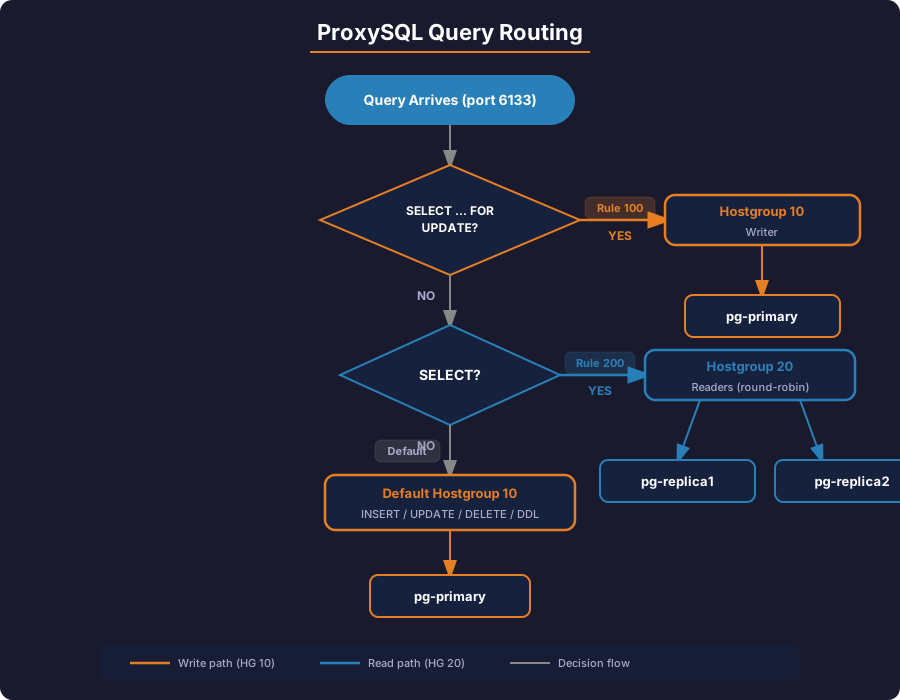
Query rules tell ProxySQL how to route different query types. We set up two rules:
SELECT ... FOR UPDATE→ writer (hostgroup 10), because it takes locks- All other
SELECT→ reader (hostgroup 20)
multipass exec proxy-orch -- PGPASSWORD=admin psql -h 127.0.0.1 -p 6132 -U admin -d admin << 'EOF'
-- Rule 100: SELECT FOR UPDATE must go to the writer (takes locks)
INSERT INTO pgsql_query_rules
  (rule_id, active, match_digest, destination_hostgroup, apply, comment)
VALUES
  (100, 1, '^SELECT.*FOR UPDATE', 10, 1, 'SELECT FOR UPDATE -> writer');

-- Rule 200: All other SELECTs go to readers
INSERT INTO pgsql_query_rules
  (rule_id, active, match_digest, destination_hostgroup, apply, comment)
VALUES
  (200, 1, '^SELECT', 20, 1, 'SELECT -> readers');

SELECT rule_id, active, match_digest, destination_hostgroup, comment
FROM pgsql_query_rules ORDER BY rule_id;

LOAD PGSQL QUERY RULES TO RUNTIME;
SAVE PGSQL QUERY RULES TO DISK;
EOF
Expected output:
 rule_id | active |    match_digest     | destination_hostgroup |           comment
---------+--------+---------------------+-----------------------+-----------------------------
 100     | 1      | ^SELECT.*FOR UPDATE | 10                    | SELECT FOR UPDATE -> writer
 200     | 1      | ^SELECT             | 20                    | SELECT -> readers
RULE EVALUATION ORDER: Rules are evaluated by ascending rule_id. apply = 1 stops further evaluation. Rule 100 catches SELECT FOR UPDATE first; rule 200 catches all remaining SELECTs. Everything else (INSERT, UPDATE, DELETE, DDL) falls through to the user's default_hostgroup (10 = writer).
How each query type gets routed:
| Query | Matches Rule | Goes To | Server |
|---|---|---|---|
SELECT * FROM orders; | Rule 200 (^SELECT) | Hostgroup 20 | pg-replica1 or pg-replica2 (round-robin) |
SELECT * FROM orders FOR UPDATE; | Rule 100 (^SELECT.*FOR UPDATE) | Hostgroup 10 | pg-primary (takes locks) |
INSERT INTO orders VALUES (...); | No rule matches | Default HG 10 | pg-primary |
UPDATE orders SET status = 'shipped'; | No rule matches | Default HG 10 | pg-primary |
DELETE FROM orders WHERE id = 5; | No rule matches | Default HG 10 | pg-primary |
Step 8: Test Read/Write Splitting
Now let's verify this routing works. Connect through ProxySQL on port 6133 and run both writes and reads:
# Write through ProxySQL (goes to hostgroup 10 = primary)
multipass exec proxy-orch -- PGPASSWORD=app_pass_2026 psql \
  -h 127.0.0.1 -p 6133 -U appuser -d appdb \
  -c "INSERT INTO replication_test (message) VALUES ('Written via ProxySQL!');"

# Read through ProxySQL (goes to hostgroup 20 = replicas)
multipass exec proxy-orch -- PGPASSWORD=app_pass_2026 psql \
  -h 127.0.0.1 -p 6133 -U appuser -d appdb \
  -c "SELECT * FROM replication_test;"
Now verify that ProxySQL routed queries to the correct hostgroups:
multipass exec proxy-orch -- PGPASSWORD=admin psql -h 127.0.0.1 -p 6132 -U admin -d admin << 'EOF'
-- Query digest shows which hostgroup handled each query
SELECT hostgroup hg, digest_text, count_star, sum_time
FROM stats_pgsql_query_digest
ORDER BY count_star DESC;
EOF
Expected output — proof of read/write splitting:
 hg |                    digest_text                     | count_star | sum_time
----+----------------------------------------------------+------------+----------
 20 | SELECT * FROM replication_test;                    | 3          | 12417
 10 | INSERT INTO replication_test (message) VALUES (?); | 2          | 8669
- Hostgroup 20 (readers): handled all
SELECTqueries - Hostgroup 10 (writer): handled all
INSERTqueries
Step 9: Check Connection Pool Stats
ProxySQL maintains a connection pool to each backend, reusing connections across application requests. A healthy pool looks like this: ConnERR = 0 (no connection failures), Latency_us under 5000 (sub-5ms), and queries distributed across replicas in hostgroup 20.
multipass exec proxy-orch -- PGPASSWORD=admin psql -h 127.0.0.1 -p 6132 -U admin -d admin << 'EOF'
SELECT hostgroup, srv_host, status, ConnUsed, ConnFree, ConnOK, ConnERR, Queries, Latency_us
FROM stats_pgsql_connection_pool
ORDER BY hostgroup;
EOF
Expected output:
 hostgroup |  srv_host   | status | ConnUsed | ConnFree | ConnOK | ConnERR | Queries | Latency_us
-----------+-------------+--------+----------+----------+--------+---------+---------+------------
 10        | pg-primary  | ONLINE | 1        | 0        | 1      | 0       | 2       | 2594
 20        | pg-replica1 | ONLINE | 1        | 0        | 1      | 0       | 2       | 2750
 20        | pg-replica2 | ONLINE | 1        | 0        | 1      | 0       | 1       | 1372
ProxySQL distributes reads across both replicas (2 queries to replica1, 1 to replica2). The ConnERR = 0 confirms no connection failures.
Step 10: Verify Runtime Server State
The runtime_pgsql_servers table shows the currently active routing configuration:
multipass exec proxy-orch -- PGPASSWORD=admin psql -h 127.0.0.1 -p 6132 -U admin -d admin << 'EOF'
SELECT hostgroup_id, hostname, port, status
FROM runtime_pgsql_servers
ORDER BY hostgroup_id, hostname;
EOF
Expected output:
 hostgroup_id |  hostname   | port | status
--------------+-------------+------+--------
 10           | pg-primary  | 5432 | ONLINE
 20           | pg-replica1 | 5432 | ONLINE
 20           | pg-replica2 | 5432 | ONLINE
Understanding Server Status Values
ProxySQL uses four status values to manage server health:
| Status | Behavior | When It Happens |
|---|---|---|
ONLINE |
Fully accepting connections and traffic | Healthy server passing all monitor checks |
SHUNNED |
No new traffic; kept for periodic re-checks | Server exceeds ping_max_failures or has too many connection errors |
OFFLINE_SOFT |
Graceful drain; existing connections finish | Manually set for planned maintenance |
OFFLINE_HARD |
Immediate disconnect; no drain | Manually set for emergency removal |
AUTOMATIC SHUNNING AND RECOVERY: When a server goes down, ProxySQL automatically shuns it (no new traffic). When it comes back online and passes health checks, ProxySQL automatically brings it back to ONLINE — no manual intervention needed.
Writer-Is-Also-Reader Setting
By default, pgsql-monitor_writer_is_also_reader = true, meaning the primary appears in both hostgroup 10 (writer) and hostgroup 20 (reader). This ensures the primary also serves reads, which is useful for small clusters.
To make replicas handle all reads exclusively:
-- On the ProxySQL admin interface (port 6132)
UPDATE global_variables SET variable_value = 'false'
  WHERE variable_name = 'pgsql-monitor_writer_is_also_reader';
LOAD PGSQL VARIABLES TO RUNTIME;
SAVE PGSQL VARIABLES TO DISK;
Pre-Checks Before Moving to Part 3
Verify every component is working before adding Orchestrator. Each check maps to a failure we hit during testing.
echo "=== ProxySQL Pre-Check Suite ==="

echo "1. All backends ONLINE:"
multipass exec proxy-orch -- PGPASSWORD=admin psql -h 127.0.0.1 -p 6132 -U admin -d admin \
  -c "SELECT hostgroup_id, hostname, port, status FROM runtime_pgsql_servers ORDER BY hostgroup_id;"

echo "2. Monitor pings healthy (no errors):"
multipass exec proxy-orch -- PGPASSWORD=admin psql -h 127.0.0.1 -p 6132 -U admin -d admin \
  -c "SELECT hostname, port, ping_error FROM monitor.pgsql_server_ping_log WHERE ping_error != '' ORDER BY time_start_us DESC LIMIT 5;"

echo "3. Read-only monitor correct (primary=0, replicas=1):"
multipass exec proxy-orch -- PGPASSWORD=admin psql -h 127.0.0.1 -p 6132 -U admin -d admin \
  -c "SELECT hostname, port, read_only FROM monitor.pgsql_server_read_only_log ORDER BY time_start_us DESC LIMIT 6;"

echo "4. Primary in hostgroup 10, replicas in hostgroup 20:"
multipass exec proxy-orch -- PGPASSWORD=admin psql -h 127.0.0.1 -p 6132 -U admin -d admin \
  -c "SELECT hostgroup_id, hostname FROM runtime_pgsql_servers WHERE hostgroup_id = 10;"

echo "5. Query rules loaded:"
multipass exec proxy-orch -- PGPASSWORD=admin psql -h 127.0.0.1 -p 6132 -U admin -d admin \
  -c "SELECT rule_id, match_digest, destination_hostgroup FROM pgsql_query_rules ORDER BY rule_id;"

echo "6. Write through ProxySQL succeeds:"
multipass exec proxy-orch -- PGPASSWORD=app_pass_2026 psql -h 127.0.0.1 -p 6133 -U appuser -d appdb \
  -c "INSERT INTO replication_test (message) VALUES ('pre-check write');" 2>&1

echo "7. Read through ProxySQL succeeds:"
multipass exec proxy-orch -- PGPASSWORD=app_pass_2026 psql -h 127.0.0.1 -p 6133 -U appuser -d appdb \
  -c "SELECT count(*) FROM replication_test;" 2>&1

echo "8. Routing stats show split (SELECTs on hg20, writes on hg10):"
multipass exec proxy-orch -- PGPASSWORD=admin psql -h 127.0.0.1 -p 6132 -U admin -d admin \
  -c "SELECT hostgroup hg, digest_text, count_star FROM stats_pgsql_query_digest ORDER BY count_star DESC LIMIT 5;"

echo "=== All ProxySQL pre-checks complete ==="
| # | Check | Failure Means |
|---|---|---|
| 1 | All backends ONLINE | Monitor can't reach a backend — check pg_hba.conf and monitor credentials |
| 2 | No ping errors | Network issue or PostgreSQL not listening on * — check listen_addresses |
| 3 | Correct read_only values | Monitor user lacks pg_monitor role or wrong credentials configured |
| 4 | Primary in hostgroup 10 | Replication hostgroups not loaded — run LOAD PGSQL SERVERS TO RUNTIME |
| 5 | Query rules present | Rules not loaded — run LOAD PGSQL QUERY RULES TO RUNTIME |
| 6 | Write succeeds | App user lacks table GRANTs — run GRANT ALL ON ALL TABLES IN SCHEMA public TO appuser |
| 7 | Read succeeds | Same as above, or replicas not in sync |
| 8 | Routing split visible | Query rules not matching — check match_digest patterns |
Troubleshooting
| Symptom | Check | Fix |
|---|---|---|
| Monitor pings show errors | SELECT * FROM monitor.pgsql_server_ping_log |
Verify pg_hba.conf allows monitor user from ProxySQL's IP |
| All servers in hostgroup 20, none in 10 | SELECT * FROM monitor.pgsql_server_read_only_log |
Check monitor credentials match the PostgreSQL monitor user |
permission denied for table through ProxySQL |
Connect directly to PostgreSQL and check GRANTs | GRANT ALL ON ALL TABLES IN SCHEMA public TO appuser; |
| Queries not being split (all to hostgroup 10) | SELECT * FROM pgsql_query_rules |
Verify rules are loaded: LOAD PGSQL QUERY RULES TO RUNTIME |
| Cannot connect via psql to port 6132 | ss -tlnp | grep proxysql |
Confirm ProxySQL is running: systemctl status proxysql |
What's Next
ProxySQL is now handling read/write splitting, connection pooling, and health monitoring. Applications connect to a single endpoint and queries are transparently routed. But ProxySQL doesn't make promotion decisions — it only detects role changes.
In Part 3, we install Orchestrator on the same proxy-orch VM and configure:
- Topology discovery via
pg_stat_replication - Automated failure detection
- Replica promotion with
pg_promote() - Post-failover hooks to notify ProxySQL
Together, ProxySQL and Orchestrator create a fully automated HA solution: Orchestrator detects failures and promotes replicas, ProxySQL detects the role change and reroutes traffic.
SAVE YOUR STATE: Run multipass stop --all to pause VMs. Everything persists across restarts.