

PostgreSQL HA with ProxySQL & Orchestrator — 4-Part Series
- Part 1: Architecture & Streaming Replication
- Part 2: ProxySQL — Read/Write Splitting
- Part 3: Orchestrator — Topology Discovery & Failover (You Are Here)
- Part 4: End-to-End Integration & Failover Scenarios
ProxySQL handles traffic routing and detects role changes automatically (as we saw in Part 2), but it doesn't make promotion decisions. When the primary fails, something needs to promote a replica and rewire the remaining replicas to follow the new primary.
That's Orchestrator's job. The ProxySQL team forked Orchestrator and added PostgreSQL streaming replication support — topology discovery via pg_stat_replication, failure detection, and automated promotion via pg_promote(). Version 4.30+ supports PostgreSQL 15, 16, and 17.
What Orchestrator Does for PostgreSQL
| Capability | How It Works |
|---|---|
| Topology discovery | Queries pg_stat_replication on the primary to find connected replicas |
| Health monitoring | Polls every instance at InstancePollSeconds intervals |
| Failure detection | Classifies failures (DeadMaster, UnreachableMaster, etc.) |
| Automated promotion | Calls pg_promote() on the best replica candidate |
| Replica rewiring | Updates primary_conninfo on surviving replicas |
| Hook execution | Runs post-failover scripts to notify ProxySQL |
| Web UI | Visual topology on port 3098 |
| REST API | Full API for discovery, recovery, and topology management |
Step 1: Install Orchestrator 4.30
Download and install the Orchestrator deb package on the proxy-orch VM:
# For ARM64 (Apple Silicon):
multipass exec proxy-orch -- sudo bash -c '
  wget -q https://github.com/ProxySQL/orchestrator/releases/download/v4.30.2/orchestrator_4.30.2_arm64.deb \
    -O /tmp/orchestrator.deb
  dpkg -i /tmp/orchestrator.deb
'

# For x86_64, replace arm64 with amd64 in the URL
The binary installs to /usr/local/orchestrator/orchestrator.
Also install orchestrator-client — a lightweight bash CLI that wraps the HTTP API. It gives you clean, scriptable access to topology and failover commands without writing curl | python3 pipelines:
# For ARM64 (Apple Silicon):
multipass exec proxy-orch -- sudo bash -c '
  wget -q https://github.com/ProxySQL/orchestrator/releases/download/v4.30.2/orchestrator-client_4.30.2_arm64.deb \
    -O /tmp/orch-client.deb
  dpkg -i /tmp/orch-client.deb
'

# For x86_64, replace arm64 with amd64
Set the API endpoint (add this to .bashrc for persistence):
multipass exec proxy-orch -- bash -c '
  echo "export ORCHESTRATOR_API=http://localhost:3098/api" >> ~/.bashrc
  export ORCHESTRATOR_API="http://localhost:3098/api"
  orchestrator-client -c help | head -5
'
Step 2: Create the PostgreSQL Configuration
Orchestrator's PostgreSQL support is activated by setting ProviderType to postgresql. The config file has four sections:
- Connection — how Orchestrator connects to PostgreSQL backends
- Polling — how often it checks each instance
- Recovery — what to do when a primary dies (auto-promote or not)
- Hooks — shell commands to run at each failover stage
Create the configuration file:
multipass exec proxy-orch -- sudo bash -c 'cat > /usr/local/orchestrator/orchestrator.conf.json << EOFCONFIG
{
  "Debug": true,
  "EnableSyslog": false,
  "ListenAddress": ":3098",

  "ProviderType": "postgresql",
  "PostgreSQLTopologyUser": "orchestrator",
  "PostgreSQLTopologyPassword": "orch_pass_2026",
  "PostgreSQLSSLMode": "disable",

  "DefaultInstancePort": 5432,
  "BackendDB": "sqlite",
  "SQLite3DataFile": "/usr/local/orchestrator/orchestrator.sqlite3",
  "InstancePollSeconds": 3,

  "UnseenInstanceForgetHours": 240,
  "SnapshotTopologiesIntervalHours": 0,
  "HostnameResolveMethod": "default",

  "ReasonableReplicationLagSeconds": 10,
  "ReasonableMaintenanceReplicationLagSeconds": 20,

  "FailureDetectionPeriodBlockMinutes": 1,
  "RecoveryPeriodBlockSeconds": 60,
  "RecoverMasterClusterFilters": ["_do_not_match_"],
  "RecoverIntermediateMasterClusterFilters": ["_do_not_match_"],

  "OnFailureDetectionProcesses": [
    "echo \"Detected {failureType} on {failureCluster}. Affected replicas: {countSlaves}\" >> /tmp/orchestrator-recovery.log"
  ],
  "PreFailoverProcesses": [
    "echo \"Will recover from {failureType} on {failureCluster}\" >> /tmp/orchestrator-recovery.log"
  ],
  "PostFailoverProcesses": [
    "echo \"Recovered from {failureType} on {failureCluster}. Failed: {failedHost}:{failedPort}; Successor: {successorHost}:{successorPort}\" >> /tmp/orchestrator-recovery.log"
  ],
  "PostMasterFailoverProcesses": [
    "echo \"Master failover complete. Failed: {failedHost}:{failedPort}; Promoted: {successorHost}:{successorPort}\" >> /tmp/orchestrator-recovery.log"
  ],

  "StatusEndpoint": "/api/status",
  "StatusSimpleHealth": true,
  "HTTPAuthUser": "",
  "HTTPAuthPassword": "",
  "PowerAuthUsers": ["*"],
  "ReadOnly": false
}
EOFCONFIG'
Key configuration explained:
| Setting | Value | Purpose |
|---|---|---|
ProviderType | postgresql | Activates the PostgreSQL code path (uses libpq protocol) |
PostgreSQLTopologyUser | orchestrator | User with pg_monitor role for reading topology and SUPERUSER for calling pg_promote() during failover |
PostgreSQLSSLMode | disable | No SSL for lab VMs (use require in production) |
InstancePollSeconds | 3 | Check each instance every 3 seconds |
FailureDetectionPeriodBlockMinutes | 1 | Minimum 1 minute between failover detections (prevents flapping) |
RecoveryPeriodBlockSeconds | 60 | Block duplicate recovery for 60 seconds after a failover |
RecoverMasterClusterFilters | ["_do_not_match_"] | Manual mode. No cluster name matches this regex, so auto-recovery never triggers. Detection and alerting still work. Promotion requires orchestrator-client -c recover. Note: check-global-recoveries is a separate runtime toggle that defaults to enabled — both the toggle AND a matching filter are required for auto-recovery. |
BackendDB | sqlite | Uses local SQLite for state storage (sufficient for single-node Orchestrator) |
Step 3: Start Orchestrator
multipass exec proxy-orch -- sudo bash -c '
  nohup /usr/local/orchestrator/orchestrator \
    -config /usr/local/orchestrator/orchestrator.conf.json \
    http > /tmp/orchestrator.log 2>&1 &

  sleep 3
  pgrep -f orchestrator && echo "Orchestrator running" || echo "FAILED"
'
Check the startup log:
multipass exec proxy-orch -- tail -5 /tmp/orchestrator.log
Expected output:
INFO continuous discovery: using PostgreSQL provider
INFO continuous discovery: starting
Step 4: Discover the Topology
Seed Orchestrator with the primary instance. It will automatically discover replicas by querying pg_stat_replication:
multipass exec proxy-orch -- curl -s http://localhost:3098/api/discover/pg-primary/5432
Expected response (truncated):
{
  "Code": "OK",
  "Message": "Instance discovered: pg-primary:5432",
  "Details": {
    "Key": {"Hostname": "pg-primary", "Port": 5432},
    "Version": "17.9",
    "ReadOnly": false,
    "Replicas": [
      {"Hostname": "192.168.2.7", "Port": 5432},
      {"Hostname": "192.168.2.8", "Port": 5432}
    ],
    "ProviderType": "postgresql"
  }
}
Orchestrator found the primary running PostgreSQL 17.9 and both replicas. Within a few seconds, it polls the replicas too and builds the full topology tree.
Step 5: Verify the Topology
Check the cluster information:
multipass exec proxy-orch -- curl -s http://localhost:3098/api/clusters-info | python3 -m json.tool
Expected output:
[
  {
    "ClusterName": "pg-primary:5432",
    "ClusterAlias": "pg-primary:5432",
    "CountInstances": 3
  }
]
Check individual instance details:
# Via the API
multipass exec proxy-orch -- curl -s "http://localhost:3098/api/cluster/pg-primary:5432" | \
  python3 -c "
import json, sys
for inst in json.load(sys.stdin):
    key = inst['Key']
    role = 'PRIMARY' if not inst['ReadOnly'] else 'REPLICA'
    depth = inst['ReplicationDepth']
    print(f\"  {key['Hostname']}:{key['Port']} [{role}] depth={depth}\")
"
Expected output:
  pg-primary:5432 [PRIMARY] depth=0
  192.168.2.7:5432 [REPLICA] depth=1
  192.168.2.8:5432 [REPLICA] depth=1
Step 6: Check the Health Endpoint
Orchestrator exposes a health API useful for monitoring and Kubernetes liveness probes:
multipass exec proxy-orch -- curl -s http://localhost:3098/api/health | python3 -m json.tool
Key fields in the response:
{
  "Code": "OK",
  "Message": "Application node is healthy",
  "Details": {
    "Healthy": true,
    "Hostname": "proxy-orch",
    "IsActiveNode": true,
    "AvailableNodes": [
      {
        "Hostname": "proxy-orch",
        "AppVersion": "4.30.2",
        "DBBackend": "/usr/local/orchestrator/orchestrator.sqlite3"
      }
    ]
  }
}
Step 7: Access the Web UI
Orchestrator provides a visual topology on port 3098. From your Mac:
# Get the proxy-orch VM IP
multipass info proxy-orch | grep IPv4
Then open http://<proxy-orch-ip>:3098 in your browser. The web UI shows a draggable topology tree with the primary at the top and replicas below.
TOPOLOGY DISCOVERY LIMITATION: Orchestrator discovers replicas by walking pg_stat_replication downward from the primary. Since this view doesn't include replica listening ports, Orchestrator uses DefaultInstancePort (5432). If your replicas run on non-standard ports, you must seed them explicitly via /api/discover/hostname/port.
Useful API Endpoints
| Endpoint | Purpose |
|---|---|
GET /api/discover/:host/:port | Seed a new instance for discovery |
GET /api/instances | List all known instances |
GET /api/clusters-info | List all clusters with member count |
GET /api/cluster/:clusterName | Get all instances in a cluster |
GET /api/instance/:host/:port | Get details for one instance |
GET /api/health | Health check (for monitoring/k8s probes) |
GET /api/audit-recovery | List past recovery operations |
GET /api/recover/:host/:port | Trigger manual recovery |
GET /api/graceful-master-takeover/:clusterName/:host/:port | Planned switchover |
Step 8: Using orchestrator-client (CLI)
While the HTTP API works, orchestrator-client is faster for day-to-day operations and scripting. It wraps every API call into a clean command with formatted output. Here are the commands you'll use most often, with real output from our cluster.
View the topology tree:
export ORCHESTRATOR_API="http://localhost:3098/api"
orchestrator-client -c topology -i 192.168.2.6:5432
192.168.2.6:5432   [0s,ok,17.9,rw,>>]
+ 192.168.2.7:5432 [null,ok,17.9,ro,>>]
+ 192.168.2.8:5432 [null,ok,17.9,ro,>>]
The output reads as: host:port [replication_lag, check_status, pg_version, rw_or_ro, gtid_hint]. The + prefix means "replica of the line above."
List clusters and find the master:
orchestrator-client -c clusters
192.168.2.6:5432
orchestrator-client -c which-cluster-master -i 192.168.2.6:5432
192.168.2.6:5432
List replicas of a given instance:
orchestrator-client -c which-replicas -i 192.168.2.6:5432
192.168.2.7:5432
192.168.2.8:5432
Check for replication problems:
orchestrator-client -c replication-analysis
When the cluster is healthy, this returns nothing. During a failure, it shows:
192.168.2.6:5432 (cluster 192.168.2.6:5432): DeadPrimary
Control automatic vs manual recovery:
# Disable automatic promotion
orchestrator-client -c disable-global-recoveries

# Check current mode
orchestrator-client -c check-global-recoveries
disabled
# Trigger manual recovery
orchestrator-client -c recover -i 192.168.2.6:5432

# Re-enable automatic mode
orchestrator-client -c enable-global-recoveries

# Acknowledge past recoveries (unblock future ones)
orchestrator-client -c ack-all-recoveries --reason "tested failover"
Full command reference:
| Command | Purpose | Works with PG? |
|---|---|---|
topology -i host:port | ASCII tree of replication topology | Yes |
clusters | List all cluster names | Yes |
which-cluster-master -i host:port | Show the primary of a cluster | Yes |
which-replicas -i host:port | List replicas of a given instance | Yes |
which-cluster-instances -i host:port | List all members of a cluster | Yes |
all-clusters-masters | List all writable masters across all clusters | Yes |
replication-analysis | Show detected problems (DeadPrimary, etc.) | Yes |
discover -i host:port | Seed a new instance for discovery | Yes |
recover -i host:port | Trigger manual failover/recovery | Yes |
disable-global-recoveries | Switch to manual mode | Yes |
enable-global-recoveries | Switch back to automatic mode | Yes |
check-global-recoveries | Show current recovery mode | Yes |
ack-all-recoveries --reason "text" | Clear recovery blocking period | Yes |
graceful-master-takeover -i host:port | Planned switchover | No — fails with Identical server id (PG lacks MySQL's server_id) |
KNOWN LIMITATION: graceful-master-takeover does not work with PostgreSQL as of Orchestrator 4.30.2. It attempts to relocate replicas using MySQL's server_id concept, which PostgreSQL doesn't have. Use recover for unplanned failover and manual pg_promote() + replica rewiring for planned switchovers.
Step 9: Why Manual Failover Is the Default
Our configuration uses RecoverMasterClusterFilters: ["_do_not_match_"] — this means Orchestrator detects failures and alerts you, but does not automatically promote a replica. You trigger promotion manually when you're ready.
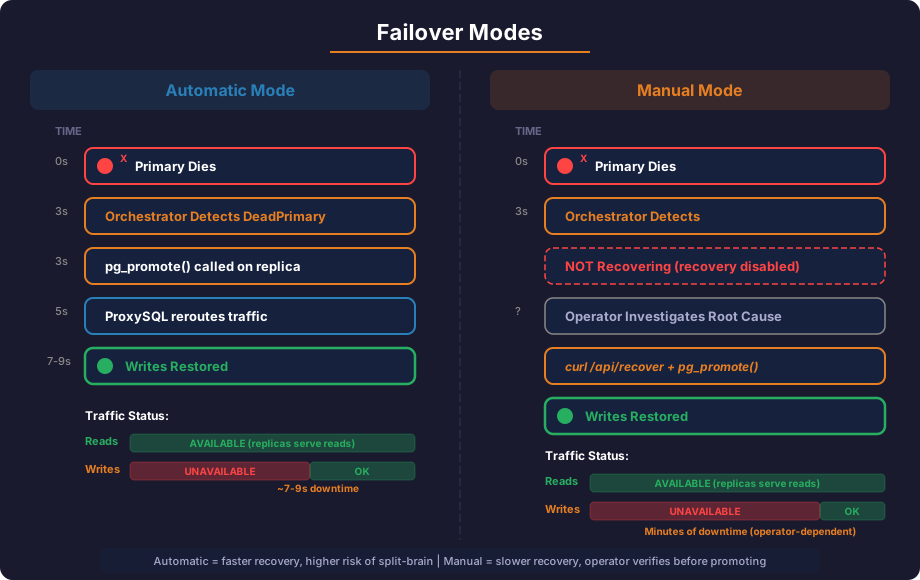
Why Not Automatic?
In MySQL, automatic failover is common because Orchestrator can rejoin the old primary as a replica using CHANGE REPLICATION SOURCE TO — a simple SQL command on a running server. If auto-failover mis-fires on a network glitch, the damage is recoverable.
PostgreSQL is different. We tested every Orchestrator rejoin method — relocate, move-below, repoint, move-gtid, set-read-only — both via CLI and HTTP API. All fail. PostgreSQL has no equivalent of CHANGE REPLICATION SOURCE TO. Once a replica is promoted, the old primary cannot be rejoined via Orchestrator. You must run a full pg_basebackup (which wipes the data directory and copies everything from scratch) or pg_rewind (which requires wal_log_hints=on to be configured in advance).
This means if automatic failover triggers on a network glitch (the primary is actually fine, just briefly unreachable):
- Orchestrator promotes a replica → now you have two primaries (split-brain)
- The old primary cannot be automatically demoted back to a replica
- You must stop the old primary, wipe its data, and
pg_basebackupfrom the new primary - On a large database, this takes minutes to hours
Manual mode avoids this entirely. Orchestrator still detects the failure instantly and fires alert hooks. You verify the primary is truly dead, then run one command to promote.
The Manual Failover Workflow
When a primary fails, Orchestrator logs the detection but does not act:
CheckAndRecover: Analysis: DeadPrimary, InstanceKey: 192.168.2.6:5432:
  NOT Recovering host (disabled globally)
The OnFailureDetectionProcesses hooks still fire — use these for Slack/PagerDuty alerts. You investigate, confirm the primary is dead, then promote:
export ORCHESTRATOR_API="http://localhost:3098/api"

# Check what Orchestrator sees
orchestrator-client -c replication-analysis
192.168.2.6:5432 (cluster 192.168.2.6:5432): DeadPrimary
# Verify the primary is truly unreachable (not just a network blip)
PGPASSWORD=monitor_pass_2026 psql -h 192.168.2.6 -U monitor -d postgres -c "SELECT 1;" 2>&1
If connection fails, the primary is genuinely down. Promote:
orchestrator-client -c recover -i 192.168.2.6:5432
192.168.2.7:5432
Orchestrator selects the most caught-up replica and calls pg_promote(). ProxySQL detects the new primary within seconds and reroutes traffic.
After recovery, acknowledge to unblock future failovers:
orchestrator-client -c ack-all-recoveries --reason "verified dead primary, promoted replica"
Enabling Automatic Mode (If You Choose To)
If your network is stable and you accept the risk, you can enable automatic recovery. This requires both layers to allow it:
- Config filter — change
RecoverMasterClusterFiltersso your cluster name matches - Runtime toggle — must be
enabled(it is by default)
With our default config (["_do_not_match_"]), the runtime toggle is already enabled but no cluster matches the filter — so auto-recovery is blocked. To enable auto-recovery, change the config filter:
Change RecoverMasterClusterFilters in /usr/local/orchestrator/orchestrator.conf.json and restart Orchestrator:
"RecoverMasterClusterFilters": [".*"]
Or scope to specific clusters only:
"RecoverMasterClusterFilters": ["production-critical-.*"]
You can also use the runtime toggle as a temporary kill switch (no restart needed):
# Temporarily block all auto-recovery (e.g. during maintenance)
orchestrator-client -c disable-global-recoveries

# Re-enable
orchestrator-client -c enable-global-recoveries

# Check current state
orchestrator-client -c check-global-recoveries
IF YOU ENABLE AUTOMATIC MODE: Understand that a false-positive failover requires a full pg_basebackup to rejoin the old primary. On a 500 GB database, that could take 30+ minutes. Manual mode costs you a few minutes of write downtime while you verify. Automatic mode risks hours of recovery work if the trigger was a network glitch.
Step 10: Understanding Failover Hooks
Orchestrator runs configurable processes at each failover stage. In our config, we log to /tmp/orchestrator-recovery.log. In production, you'd use these hooks to:
- Pre-failover: Drain the old primary in ProxySQL (
OFFLINE_SOFT) - Post-failover: Update ProxySQL's
pgsql_serversto reflect the new topology - Notification: Alert via Slack, PagerDuty, etc.
Example production hook for ProxySQL integration:
#!/bin/bash
# /usr/local/bin/proxysql-failover-hook.sh
# Called by Orchestrator's PostMasterFailoverProcesses

NEW_PRIMARY="$1"
OLD_PRIMARY="$2"

PGPASSWORD=admin psql -h 127.0.0.1 -p 6132 -U admin -d admin << EOF
-- Move old primary to reader hostgroup
UPDATE pgsql_servers SET hostgroup_id = 20 WHERE hostname = '${OLD_PRIMARY}';
-- Move new primary to writer hostgroup
UPDATE pgsql_servers SET hostgroup_id = 10 WHERE hostname = '${NEW_PRIMARY}';
LOAD PGSQL SERVERS TO RUNTIME;
SAVE PGSQL SERVERS TO DISK;
EOF
PROXYSQL AUTO-DETECTION: In practice, ProxySQL's read-only monitor often detects the role change before the hook runs. The hook provides an explicit, immediate update — a belt-and-suspenders approach. Both methods work; using both means faster failover.
Troubleshooting
| Symptom | Check | Fix |
|---|---|---|
| Orchestrator starts but shows "Not elected as active node" | This is normal for the first 10 seconds | Wait for the election period to pass; it will become active |
| Discovery fails with "connection refused" | Check pg_hba.conf for the orchestrator user |
Add host postgres orchestrator <subnet> scram-sha-256 |
| Replicas not discovered | Check pg_stat_replication on primary |
Ensure replicas are connected and streaming |
| "DeadMasterWithoutReplicas" on failover | primary_conninfo contains escaped-quote hostnames (host=''pg-primary'') causing Orchestrator to split the topology into two clusters |
Use IP addresses in primary_conninfo instead of hostnames. After pg_basebackup -R, edit postgresql.auto.conf to replace quoted hostnames with IPs. Seed Orchestrator via /api/discover/<primary-ip>/5432. |
| Web UI not loading | curl http://localhost:3098/api/health |
Check Orchestrator process is running and port 3098 is not blocked |
Pre-Checks Before Moving to Part 4
Part 4 will kill the primary and expect automated recovery. Every check below must pass or the failover will fail silently or produce confusing errors.
echo "=== Orchestrator Pre-Check Suite ==="

echo "1. Orchestrator process running:"
multipass exec proxy-orch -- pgrep -c orchestrator

echo "2. Health endpoint responds OK:"
multipass exec proxy-orch -- curl -s http://localhost:3098/api/health | python3 -c \
  "import json,sys; d=json.load(sys.stdin); print(f'  Healthy: {d[\"Details\"][\"Healthy\"]}, Active: {d[\"Details\"][\"IsActiveNode\"]}')"

echo "3. Single cluster with 3 members:"
multipass exec proxy-orch -- curl -s http://localhost:3098/api/clusters-info | python3 -c \
  "import json,sys; [print(f'  {c[\"ClusterName\"]}: {c[\"CountInstances\"]} members, AutoRecovery={c[\"HasAutomatedMasterRecovery\"]}') for c in json.load(sys.stdin)]"

echo "4. Topology correct (1 PRIMARY + 2 REPLICA):"
multipass exec proxy-orch -- curl -s "http://localhost:3098/api/cluster/$(multipass exec proxy-orch -- curl -s http://localhost:3098/api/clusters-info | python3 -c 'import json,sys;print(json.load(sys.stdin)[0][\"ClusterName\"])')" | python3 -c \
  "import json,sys; [print(f'  {i[\"Key\"][\"Hostname\"]}:{i[\"Key\"][\"Port\"]} [{\"PRIMARY\" if not i[\"ReadOnly\"] else \"REPLICA\"}]') for i in json.load(sys.stdin)]"

echo "5. HasAutomatedMasterRecovery = true:"
multipass exec proxy-orch -- curl -s http://localhost:3098/api/clusters-info | python3 -c \
  "import json,sys; c=json.load(sys.stdin)[0]; print(f'  AutoRecovery: {c[\"HasAutomatedMasterRecovery\"]}')"

echo "6. No stale recovery blocks:"
multipass exec proxy-orch -- curl -s http://localhost:3098/api/audit-recovery | python3 -c \
  "import json,sys; d=json.load(sys.stdin); print(f'  Pending recoveries: {len(d)}')"

echo "7. Orchestrator user can call pg_promote():"
multipass exec pg-primary -- sudo -u postgres psql -tAc \
  "SELECT usesuper FROM pg_user WHERE usename = 'orchestrator';"

echo "8. ProxySQL still routing correctly:"
multipass exec proxy-orch -- PGPASSWORD=admin psql -h 127.0.0.1 -p 6132 -U admin -d admin \
  -c "SELECT hostgroup_id, hostname, status FROM runtime_pgsql_servers ORDER BY hostgroup_id;"

echo "=== All Orchestrator pre-checks complete ==="
| # | Check | If It Fails |
|---|---|---|
| 1 | Process running | Start Orchestrator — nohup /usr/local/orchestrator/orchestrator -config ... http & |
| 2 | Health OK + Active | Wait 10 seconds after startup for leader election |
| 3 | Single cluster, 3 members | If multiple clusters appear, you have the hostname quoting bug — use IP addresses in primary_conninfo and re-seed |
| 4 | 1 PRIMARY + 2 REPLICA | Check pg_stat_replication on primary and re-discover |
| 5 | AutoRecovery = true | Check RecoverMasterClusterFilters: [".*"] in config |
| 6 | No stale recoveries | Acknowledge old recoveries: curl /api/ack-all-recoveries/reset |
| 7 | SUPERUSER = t | Grant it: ALTER USER orchestrator WITH SUPERUSER; — without this, pg_promote() fails with permission denied |
| 8 | ProxySQL routing correct | Primary should be in hostgroup 10 — if not, check read-only monitor |
CRITICAL: Check #3 (single cluster) and #7 (SUPERUSER) are the two issues that silently prevent automated failover. If you see multiple clusters, Orchestrator reports DeadMasterWithoutReplicas instead of DeadPrimary and does nothing. If SUPERUSER is missing, Orchestrator detects the failure but every pg_promote() call fails with permission denied.
What's Next
Orchestrator is running, discovering the topology, and ready to handle failures. In Part 4, we put everything together and run real failover scenarios:
- Kill the primary VM and watch automatic recovery
- Planned switchover using Orchestrator's graceful takeover API
- Rejoin a failed primary as a replica
- End-to-end verification through ProxySQL after each failover
- Production hardening checklist
KEEP VMs RUNNING: Part 4 tests failover scenarios on the live cluster. Keep all VMs running for the next part.